# Add custom font to Sage9+TailwindCSS
**URL:** https://discourse.roots.io/t/add-custom-font-to-sage9-tailwindcss/18649
**Category:** sage
**Tags:** sage9
**Created:** 2020-07-12T11:31:11Z
**Posts:** 5
## Post 1 by @kpoxo6op — 2020-07-12T11:31:11Z
How do I add Roboto font to my Sage 9.0.9 + TailwindCSS 1.4.1 site?
Here is my progress so far.
1. I downloaded and copied Roboto TTFs to `assets/fonts`.
> **ls assets/fonts**
>
> ```
> Roboto-Black.ttf
> ...
> Roboto-Regular.ttf
> Roboto-Thin.ttf
> Roboto-ThinItalic.ttf
> ```
1. In `tailwind.config.js`, I moved existing entry `'Roboto'` to the top of `sans` entry like this:
> **fontFamily section at tailwind.config.js**
>
> ```
> fontFamily: {
> sans: [
> 'Roboto', /*we should now use Roboto when displaying font-sans class*/
> 'system-ui',
> ...
> '"Segoe UI"',
> /*'Roboto', - moved from here to the top*/
> ...
> ],
> serif: ['Georgia', 'Cambria', ...],
> },
> ```
1. I made sure that TailwindCSS picks the first entry from `fontFamily` when evaluating `font-*` entries. I tried swapping `serif` fonts `Georgia` and `Cambria`.
> **Screenshots - it worked**
>
> ```
> fontFamily: {
> serif: ['Georgia', 'Cambria', ...],
> /*serif: ['Cambria', 'Georgia', ...],*/
> },
> ```
>
> `hero.blade.php`:
>
> ```
> This is Georgia font
>
> ```
>
> 
> 
1. However, I can’t display my `sans-` family text with `Roboto`. Roboto font is not displayed in Dev Tools, I always see `Segoe UI` instead in Dev tools.
My blade file and Dev tools screenshot:
```
This is always Segoe UI, not Roboto :(
```
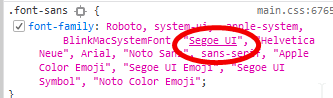
There is no new `dist/fonts` folder in my site directory after building.
I looked at the existing topics but could’t find relevant posts unfortunately.
What do I miss here?
---
## Post 2 by @huubl — 2020-07-12T22:40:14Z
Hi,
You probably need to include the Roboto font by @font-face, see: [https://tailwindcss.com/docs/adding-base-styles/](https://tailwindcss.com/docs/adding-base-styles/)
---
## Post 3 by @nckrtl — 2020-07-13T07:40:24Z
Either your font files are not being found, due to incorrect paths or you should check you’re using quotes in your tailwind config like “Roboto”, Instead of Roboto,
---
## Post 4 by @kpoxo6op — 2020-07-13T07:43:28Z
thanks @huubl,
I can see now that my build outputs folder `dist/fonts/Roboto/`
My next issue is the build generates incorrect font URL for some reason. This is my **wrong** font URL which results is `404` error on my page:
```
http://localsite.test/wp-content/themes/mytheme/dist/fonts/Roboto/Roboto-Medium.ttf
```
By looking at other resource URLs, I can figure out what would be the correct URL value:
```
http://localsite.test/app/themes/mytheme/dist/fonts/Roboto/Roboto-Medium.ttf
```
The wrong URL part is `wp-content`. It should be should be `app` instead:
```
wrong - http://localsite.test/wp-content/themes/mytheme/dist/fonts/Roboto/Roboto-Medium.ttf
correct - http://localsite.test/app /themes/mytheme/dist/fonts/Roboto/Roboto-Medium.ttf
```
What is missing now?
---
## Post 5 by @kpoxo6op — 2020-07-13T08:16:39Z
Ok, I don’t know what happened but my font URLs are correct now.
- I went to [http://google-webfonts-helper.herokuapp.com/fonts/roboto?subsets=latin](http://google-webfonts-helper.herokuapp.com/fonts/roboto?subsets=latin)
- selected `Roboto`
- ticked `100`, `300`, `regular` etc tickboxes
- selected `Modern Browsers`
- downloaded and extracted `roboto-v20-latin.zip` to `assests/fonts`
- copied bunch of @font-face statements to `styles/common/_fonts.scss`
- added `@import "common/fonts";` to `styles/main.scss`
- built my site again, my texts are displayed with `Roboto` as expected
Files:
> **main.scss**
>
> ```
> /**
> * This injects Tailwind's base styles, which is a combination of
> * Normalize.css and some additional base styles.
> */
> @tailwind base;
>
> /** Import fonts */
> @import "common/fonts";
> ...
> ```
> **_fonts.scss**
>
> ```
> /* roboto-100 - latin */
>
> @font-face {
> font-family: "Roboto";
> font-style: normal;
> font-weight: 100;
> src: local("Roboto Thin"), local("Roboto-Thin"), url("../fonts/roboto-v20-latin/roboto-v20-latin-100.woff2") format("woff2"), url("../fonts/roboto-v20-latin/roboto-v20-latin-100.woff") format("woff");
> }
>
> /* roboto-100italic - latin */
> @font-face {
> font-family: "Roboto";
> font-style: italic;
> font-weight: 100;
> src: local("Roboto Thin Italic"), local("Roboto-ThinItalic"), url("../fonts/roboto-v20-latin/roboto-v20-latin-100italic.woff2") format("woff2"), url("../fonts/roboto-v20-latin/roboto-v20-latin-100italic.woff") format("woff");
> ...
> }
> ```
`ls /resources/assets/fonts`
> **file list**
>
> ```
> roboto-v20-latin-100.woff
> roboto-v20-latin-100.woff2
> roboto-v20-latin-100italic.woff
> roboto-v20-latin-100italic.woff2
> ...
> ```
---
## Post 6 by @system — 2020-08-23T11:31:12Z
This topic was automatically closed after 42 days. New replies are no longer allowed.