# Asynchronous CSS Loading in Sage
**URL:** https://discourse.roots.io/t/asynchronous-css-loading-in-sage/14108
**Category:** sage
**Tags:** guide
**Created:** 2018-11-12T17:35:54Z
**Posts:** 30
## Post 1 by @jasonbaciulis — 2018-11-12T17:35:54Z
Originally published at: [https://roots.io/guides/asynchronous-css-loading-in-sage/](https://roots.io/guides/asynchronous-css-loading-in-sage/)
Why load CSS asynchronously? All stylesheets are render-blocking by nature. Meaning that referencing CSS stylesheets with \ causes the browser to stop parsing the HTML and wait while a stylesheet loads. This is bad for performance and will trigger warnings on all page speed tests. Asynchronous CSS automation The new \ attribute allows…
---
## Post 2 by @davids — 2018-11-16T04:02:10Z
Great guide, just what I was looking for! thank you @jasonbaciulis.
However, I’m getting a `FatalThrowableError: Call to a member function setAttribute() on null` on the `$tag->setAttribute('rel', 'preload')` line for the Async load CSS filter.
`$dom` and `$tag` vars look like this on that line. Am I missing something? Sorry if it’s a dumb question, but I’m kinda new to this:
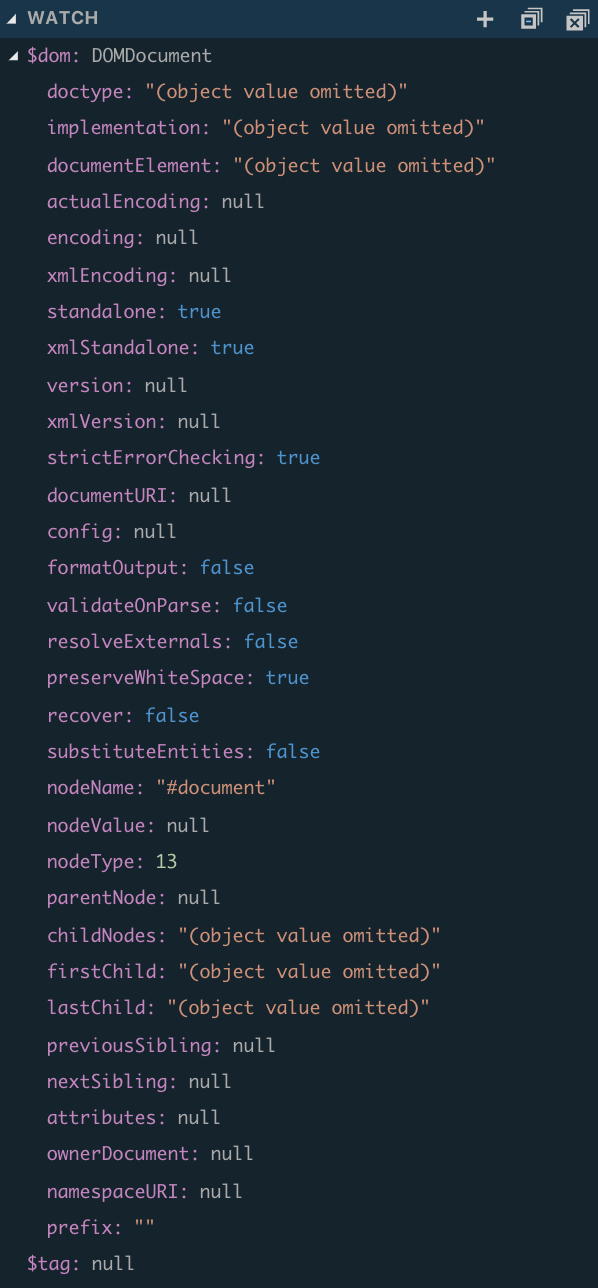
Thanks for your help and this awesome guide!
---
## Post 3 by @jasonbaciulis — 2018-11-17T10:38:04Z
Try debugging a `$handle` and `$html` values. It looks like `$handle` is missing on some tag and maybe you can pinpoint which `` tag is loaded at that time.
---
## Post 4 by @davids — 2018-11-17T19:30:11Z
Found it! The [`clean_style_tag` function](https://github.com/roots/soil/blob/master/modules/clean-up.php#L79) on Soil removes ids from style tags, so `getElementById($handle . '-css')` returns null.
Solved it by disabling `add_theme_support('soil-clean-up')`, though I’m loosing all the other goodies from Soil’s clean up :stuck_out_tongue:
---
## Post 5 by @jasonbaciulis — 2018-11-18T11:23:46Z
Good catch. So it’s something to be aware with other optimization plugins as well that might remove ids.
You could try calling async CSS earlier before Soil. Just need to find out what priority Soil is using and reduce the number from `999`.
---
## Post 6 by @paulus005 — 2018-12-13T08:18:35Z
When i test this local it works fine but after deploying it to staging I got a http server 500 error. any idea? Still got the error “FatalThrowableError: Call to a member function setAttribute() on null” even if I disable soil-clean-up or decrease the priority of the filter to , for example , 10
hmmm getElementByID seems to bee ‘null’??
---
## Post 7 by @jasonbaciulis — 2018-12-13T09:49:13Z
You mentioned it works in your local env, so try to pinpoint the differences between environments. Maybe there are additional plugins running on staging that could be removing ids?
---
## Post 8 by @paulus005 — 2018-12-13T12:16:18Z
Unfortunately, no result looks like the setups are similar. Only difference was W3 Total cache, which was disabled on local env . but disabling this on staging did not solve the issue.
---
## Post 9 by @db12 — 2019-02-08T23:18:31Z
What might be the modifications necessary – made to the filter and polyfill scripts – to only enable async CSS for specific stylesheets.
The reason I ask is because I have a specific project with javascript firing that will conflict with inline styling. I need certain stylesheets to load on page-load (without being inlined), and others to load in the background.
---
## Post 10 by @duffner — 2019-03-31T19:13:57Z
I’m having an issue when using your tutorial. Everything appears to work correctly except, I get the following error on the console.
Uncaught (in promise) TypeError: Failed to resolve module specifier ‘fg-loadcss/dist/cssrelpreload.min’
When following this the templates are outputting this.
```
```
I also noticed I get an error from yarn linting
**yarn run v1.12.3**
$ npm run -s lint:scripts && npm run -s lint:styles
/Users/robert/Sites/mysite.com/site/web/app/themes/mytheme/resources/assets/scripts/cssrelpreload.js
1:7 error Parsing error: Unexpected token (
**:heavy_multiplication_x: 1 problem (1 error, 0 warnings)**
error Command failed with exit code 1.
info Visit **[https://yarnpkg.com/en/docs/cli/run](https://yarnpkg.com/en/docs/cli/run)** for documentation about this command.
Here is the content of the file cssrelpreload.js
import(“fg-loadcss/dist/cssrelpreload.min”);
Did I do something wrong?
---
## Post 11 by @jasonbaciulis — 2019-04-12T05:01:09Z
> [@duffner](#):
>
> import(“fg-loadcss/dist/cssrelpreload.min”)
I made a syntax error in the guide. Remove parentheses from `import` path. It should be:
```
import "fg-loadcss/dist/cssrelpreload.min";
```
---
## Post 12 by @nathansouza — 2019-06-30T14:00:26Z
Hi,
I ran `yarn build:production` and the `critical-home.css` file was generated correctly in the styles folder, but not added to `assets.json`
then this line `$critical_CSS = asset_path ('styles/critical-home.css');` returns empty.
I think there is need of adjustment in the webpack, but I do not know exactly how to do it.
Would you help me?
---
## Post 13 by @DiegoBetto — 2019-07-09T18:37:52Z
Watchout, if critial files are not correctly generated and you open your website it seems that a lot of requests are made to db server. A lot (50 sleeping proccess in 3 seconds) :slight_smile: by this part
```
add_action('wp_head', function () {
if (is_front_page()) {
$critical_CSS = \App\asset_path('styles/critical-home.css');
} elseif (is_singular()) {
$critical_CSS = \App\asset_path('styles/critical-singular.css');
} else {
$critical_CSS = \App\asset_path('styles/critical-archive.css');
}
if (fopen($critical_CSS, 'r')) {
echo '';
}
```
---
## Post 14 by @codepuncher — 2019-07-10T15:31:42Z
I’ve rewritten it a little bit to use the local files instead of requesting remote files (also using WP\_Filesystem), this may be of use.
This is the main code:
```
# app/filters.php
add_filter('style_loader_tag', function (string $html, string $handle): string {
if ('development' === WP_ENV || is_admin() || ! is_front_page()) {
return $html;
}
$dom = new \DOMDocument();
$dom->loadHTML($html);
$tag = $dom->getElementById("{$handle}-css");
$tag->setAttribute('rel', 'preload');
$tag->setAttribute('as', 'style');
// phpcs:ignore WordPress.WP.EnqueuedResources.NonEnqueuedStylesheet
$tag->setAttribute('onload', "this.onload=null;this.rel='stylesheet'");
$tag->removeAttribute('type');
$html = $dom->saveHTML($tag);
return $html;
}, 999, 3);
add_action('wp_head', function (): void {
/** @var \WP_Filesystem_Base */
global $wp_filesystem;
if ('development' === WP_ENV || ! is_front_page()) {
return;
}
if (empty($wp_filesystem)) {
require_once ABSPATH . '/wp-admin/includes/file.php';
}
\WP_Filesystem();
$preload_script = get_theme_file_path() . '/resources/assets/scripts/cssrelpreload.js';
if ($wp_filesystem->is_readable($preload_script)) {
// phpcs:ignore WordPress.Security.EscapeOutput.OutputNotEscaped
echo '';
}
}, 101);
add_action('wp_head', function (): void {
if ('development' === WP_ENV || ! is_front_page()) {
return;
}
/** @var \WP_Filesystem_Base */
global $wp_filesystem;
if (empty($wp_filesystem)) {
require_once ABSPATH . '/wp-admin/includes/file.php';
}
\WP_Filesystem();
$critical_CSS = asset_file_path('styles/critical-home.css');
if ($wp_filesystem->is_readable($critical_CSS)) {
// phpcs:ignore WordPress.Security.EscapeOutput.OutputNotEscaped
echo '';
}
}, 1);
```
This code is for `assets_file_path()` which is used above.
```
# config/assets.php
'path' => get_theme_file_path().'/dist',
```
```
# app/helpers.php
function asset_file_path(string $asset): string
{
return config('assets.path') . '/' . sage('assets')->get($asset);
}
```
Read more of the above here: [SVG sprites workflow](https://discourse.roots.io/t/svg-sprites-workflow/10903/12)
---
## Post 15 by @Mikey242 — 2019-09-05T09:05:17Z
Hi everyone,
Just been implementing this into my theme and noticed that in Firefox (currently on 69) I get a FOUC as the page loads. I did a few tests and disabled the main stylesheet only leaving the critical styles and the page looks fine when loaded but I still get a FOUC. When I disabled the function adding the preload attributes etc I no longer have a problem.
Anyone else experiencing this or knows what is going on?
Thanks
edit: I narrowed it down by just disabling the line “$tag-\>setAttribute(‘rel’, ‘preload’)” which immediately solved the problem but of course defeates the purpose.
edit2: I missed a few things. Since I am working on a child-theme I forgot to disable the parent css, when I did the page was mostly unstyled which meaning the FOUC is to be expected. I think this is something to do with my configuration of html-critical-webpack-plugin.
---
## Post 16 by @jasonbaciulis — 2019-09-05T10:21:26Z
I’ll write an update to this guide over the weekend as I learned a cool trick to simplify Async CSS. Here is the full article about it: [https://www.filamentgroup.com/lab/load-css-simpler/](https://www.filamentgroup.com/lab/load-css-simpler/)
In short, now you can drop the polyfill and instead of preloading now you can use this:
```
/**
* Async load CSS.
*/
if (env('WP_ENV') === 'production') {
add_filter('style_loader_tag', function ($html, $handle, $href) {
if (is_admin()) {
return $html;
}
$dom = new \DOMDocument();
$dom->loadHTML($html);
$tag = $dom->getElementById($handle . '-css');
$tag->setAttribute('media', 'print');
$tag->setAttribute('onload', "this.media='all");
$tag->removeAttribute('type');
$tag->removeAttribute('id');
$html = $dom->saveHTML($tag);
return $html;
}, 9999, 3);
}
```
Though regarding FOUC, that is expected when loading CSS async but critical CSS should solve that. So first thing would be to check if critical CSS is generated at all. Later I’ll share a better way to inline critical CSS as well.
---
## Post 17 by @Mikey242 — 2019-09-05T10:45:46Z
Thanks for your help and awesome article [jasonbaciulis](https://discourse.roots.io/t/asynchronous-css-loading-in-sage/14108/16).
Just in case, I noticed a missing single quote after the word “all”:
```
$tag->setAttribute('onload', "this.media='all");
```
it should be:
```
$tag->setAttribute('onload', "this.media='all'");
```
edit: just tested it and it does seems to work without the polyfill
---
## Post 18 by @aaronjpitts — 2019-09-17T04:45:04Z
Did anyone manage to stop the `clean_style_tag` filter from soil? I for the life of me can’t get it removed using remove\_filter.
---
## Post 19 by @aaronjpitts — 2019-09-26T05:46:09Z
If anyone else is interested I stopped Soil’s `clean_style_tag` using the below:
```
add_action( 'after_setup_theme', function () {
remove_filter('style_loader_tag','Roots\Soil\CleanUp\clean_style_tag');
}, 100);
```
---
## Post 20 by @RyanBaron — 2019-10-09T02:56:42Z
@jasonbaciulis Thanks for the great guide. I was following the instructions here: [https://roots.io/guides/asynchronous-css-loading-in-sage/](https://roots.io/guides/asynchronous-css-loading-in-sage/) and I’m running into an issue with the style media=“print” and critical css working together. Each of them work independently, but when I use them together I get an error when running yarn build:production locally. Error: “No usable stylesheets found in html source. Try to specify the stylesheets manually.” I believe critical css is skipping the css files on the page because they have the media print attribute.
In webpack.config.optimize.js, I can specify the css value in the HtmlCriticalWebpackPlugin and get a successful build with media=“print” attributes enabled:
/resources/assets/build/webpack.config.optimize.js
…
new HtmlCriticalWebpackPlugin({
base: config.paths.dist,
src: config.devUrl,
dest: “styles/critical-home.css”,
ignore: ["@font-face", /url(/],
inline: false,
minify: true,
extract: false,
css: [config.paths.dist + ‘/styles/main\_18b3c83b.css’],
dimensions: [
{
width: 360,
height: 640,
},
{
width: 1920,
height: 1080,
},
],
penthouse: {
blockJSRequests: false,
},
}),
…
but since css the file names change, with different hash values added during production builds, this hard coded solution doesn’t work long term. One possible solution could be to access the .css file names from /dist/assets.json and populate the css array in HtmlCriticalWebpackPlugin
---
## Post 21 by @Alfalfa — 2019-10-09T09:23:56Z
I am having the same problem, but I’m not specifying the CSS route. As far as I understand that’s not needed as the plugin will generate a CSS file from the HTML specified in ‘src’.
What is your config.devUrl value? It works for me with [http://localhost:8000](http://localhost:8000), but not if I use my dev or prod URLs.
Asked for help in this thread too [Critical CSS plugin](https://discourse.roots.io/t/critical-css-plugin/11855/26)
Edit: Forgot to say that I’m running Sage in a docker container.
---
## Post 22 by @RyanBaron — 2019-10-10T03:00:25Z
> [@Alfalfa](#):
>
> I am having the same problem, but I’m not specifying the CSS route. As far as I understand that’s not needed as the plugin will generate a CSS file from the HTML specified in ‘src’.
@Alfalfa, I would prefer not to have to specify the css file(s) and instead have it generate from the src html. That does work, but only when I disable the functionality that adds the media=“print” and onload=“this.media=‘all’” in the ‘style\_loader\_tag’ filter
My config.devUrl config value is my custom local development url, not [http://localhost](http://localhost)
Your issue could also be related to the media=“print” and onload=“this.media=‘all’” issue I am running into as well.
I am using sage in a lando/docker environment.
---
## Post 23 by @Alfalfa — 2019-10-10T07:59:48Z
Hey @RyanBaron thanks for your answer. It’s not a problem with the async, as I have tried the critical CSS with and without it, and it is still failing with the following error:
```
95% emitting TypeError: Cannot read property 'content-type' of undefined
at temp (/home/jenkins/workspace/some_path/node_modules/critical/lib/file-helper.js:106:37)
at requestAsync.then.response (/home/jenkins/workspace/some_path/node_modules/critical/lib/file-helper.js:204:27)
at process._tickCallback (internal/process/next_tick.js:68:7) error Command failed with exit code 1.
```
I have been using localhost:8000 as a devUrl the whole time. I have local environment, dev, staging and prod. Everything works fine so far with this devUrl, should I change it to be my dev URL? I don’t understand how the ‘src’ works in here. I’ve tried dev and staging URLs anyway, and it’s still failing in the same point.
If I have a look to the line shown in the error, it’s the following:
```
const contentType = resp.headers['content-type'];
```
About the async error you have, I had the same problem and solved it adding an URL parameter as follows:
In your webpack.config.optimize.js change the ‘src’ to be `src: config.devUrl + '?no-async=true',`, and then in your filters:
```
if (is_admin() || $_GET['no-async']) {
return $html;
}
```
This way it won’t load CSS asynchronously and the critical CSS will be generated without problems. This works for me in localhost as I said, can’t make it work in dev/staging, even removing the async.
> [@RyanBaron](#):
>
> My config.devUrl config value is my custom local development url, not [http://localhost](http://localhost)
Wouldn’t be the same [http://localhost](http://localhost) or [http://test.dev](http://test.dev) ?
Any ideas?
---
## Post 24 by @alwaysblank — 2019-10-10T15:19:28Z
I don’t fully understand your dev setup, but the `can't read content type of undefined` combined with the fact that the line throwing that error appears to be dealing with an HTTP response object is what I might expect to see if something was trying to get a CSS file while you were running `yarn start`. When using HMR Sage 9 doesn’t actually generate any CSS files: it inserts the CSS directly into the DOM so that the styles update without a page reload. Not sure if that’s your issue, though.
---
## Post 25 by @Alfalfa — 2019-10-10T15:34:11Z
That’s true, but the problem appears when running `yarn build:production` which creates all the assets for production. Doing that locally it creates a ‘dist’ folder with scripts and styles, and I can see my critical.css file being generated. The error appears trying to do the same in my dev server, which is deployed by a jenkins job creating a docker container.
---
## Post 26 by @alwaysblank — 2019-10-10T15:47:59Z
Is your entire project (web server, build process, etc) in a single container, or do you have a couple of networked containers handling different concerns? I fully admit I’m not super familiar with docker, but my understanding is that containers have an internal network they communicate with each other on. Is it possible that your build process is unable to access your web server because the external url you use to access the server isn’t available on the internal network?
---
## Post 27 by @Alfalfa — 2019-10-11T08:25:35Z
I had thought on that but no, it’s in a single container and it should be able to access to any external URL as in the docker container it’s installing different external resources. Any external URL should be valid to get the critical CSS, right? At the moment the config.devUrl is pointing to my dev server, but I could point directly to production site if I wanted too, right?
Just want to make sure that I understand correctly how the devUrl is being used as a ‘src’.
Another concern I had is if the docker container couldn’t use headless Chrome, so I installed it too, but still no luck :frowning:
---
## Post 28 by @jasonbaciulis — 2019-10-13T16:01:03Z
I get the same thing locally if I don’t use env variables and try to run both HtmlCriticalWebpackPlugin and setting `media="print"`. So it depends on your deployment setup, but if you use trellis to run `yarn build:production` locally and use env variables to async CSS only in prod then that combo should work.
While playing around with this I also found a bug with getting a critical CSS path. Currently `locate_asset()` runs twice in critical CSS snippet and inside `get_file_contents()` so here is the update:
```
add_action('wp_head', function (): void {
if ('development' === env('WP_ENV')) {
return;
}
if (is_front_page()) {
// $critical_CSS = locate_asset('styles/critical-home.css');
$critical_CSS = 'styles/critical-home.css';
} elseif (is_singular()) {
// $critical_CSS = locate_asset('styles/critical-singular.css');
$critical_CSS = 'styles/critical-singular.css';
} else {
// $critical_CSS = locate_asset('styles/critical-landing.css');
$critical_CSS = 'styles/critical-landing.css';
}
// if (file_exists($critical_CSS)) {
if (file_exists(locate_asset($critical_CSS))) {
echo '';
}
}, 1);
```
@ben I’d apreciate if you could update the guide.
---
## Post 29 by @Manish_Singh — 2020-08-19T03:04:34Z
I a looking to add rel=“preload” in stylesheet and i follow your instruction but not affecting anything.
can you please guide me where i can add
```
/**
* Async load CSS
*/
add_filter('style_loader_tag', function (string $html, string $handle): string {
if ('development' === env('WP_ENV') || is_admin()) {
return $html;
}
$dom = new \DOMDocument();
$dom->loadHTML($html);
$tag = $dom->getElementById($handle . '-css');
$tag->setAttribute('media', 'print');
$tag->setAttribute('onload', "this.media='all'");
$tag->removeAttribute('type');
$tag->removeAttribute('id');
$html = $dom->saveHTML($tag);
return $html;
}, 999, 2);
```
---
## Post 30 by @jasonbaciulis — 2020-08-31T16:13:22Z
Best to add it to `filters.php`.
Keep in mind that this is not going to run in development because we add:
```
if ('development' === env('WP_ENV') || is_admin()) {
return $html;
}
```
So comment out this part for testing in development.