Hi @alwaysblank,
I don’t know if this is a bug but when I tried to use other ports like http://localhost:8000, the proxy was showing the correct port. It looks like all ports were shown as expected except the http://localhost:8080.
Here is the screenshot of using other port (http://localhost:8000):
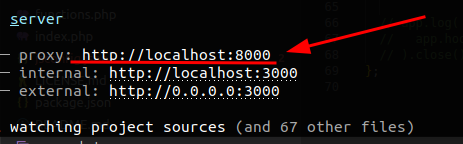
As you can see, the proxy was showing the correct port.
Here is my bud.config.js:
/**
 * Build configuration
 *
 * @see {@link https://bud.js.org/guides/getting-started/configure}
 * @param {import('@roots/bud').Bud} app
 */
export default async (app) => {
  // console.log(app.hooks.all());
  app
    /**
     * Application entrypoints
     *
     * Paths are relative to your resources directory
     */
    .entry({
      app: {
        import: ['@scripts/app.js', '@styles/app.scss'],
        publicPath: '/app/themes/example-theme/public/'
      },
      editor: {
        import: ['@scripts/editor', '@styles/editor'],
        publicPath: '/app/themes/example-theme/public/'
      },
    })

    .provide({
      jquery: ["jQuery", "$"],
    })
    /**
     * These files should be processed as part of the build
     * even if they are not explicitly imported in application assets.
     */

    .assets([
      {
        from: app.path('@src/images'),
        to: app.path('@dist/images'),
      },
      {
        from: app.path('@src/fonts'),
        to: app.path('@dist/fonts'),
      },
    ])

    .runtime(false)
    .splitChunks(false)

    /**
     * These files will trigger a full page reload
     * when modified.
     */
    .watch(["resources/views/**/*", "app/**/*"])

    /**
     * Target URL to be proxied by the dev server.
     *
     * This is your local dev server.
     */
    .proxy('http://localhost:8080')

    /**
     * Development URL
     */
    .serve('http://0.0.0.0:3000');

  // app.log(
  //   app.hooks.filter('build')
  // ).close()
};
By the way, I’m using sage tag v10.4.0