# Tailwind 4 utilities in editor being overridden due to cascade layers
**URL:** https://discourse.roots.io/t/tailwind-4-utilities-in-editor-being-overridden-due-to-cascade-layers/29283
**Category:** sage
**Tags:** sage11, acf-composer
**Created:** 2025-02-20T18:18:48Z
**Posts:** 13
## Post 1 by @drbroad — 2025-02-20T18:18:48Z
One issue I was having with the latest release of sage, is that the styles in wp-reset & common were overriding tailwind utility classes in the Gutenberg editor.
For example, lets say I am using acf composer to make my gutenberg blocks. My simple block contains an h1 containing the classes `bg-gray-900 text-gray-200`.
Due to the wp-reset styles not being loaded into any layer - they take priority over the tailwind utilities:
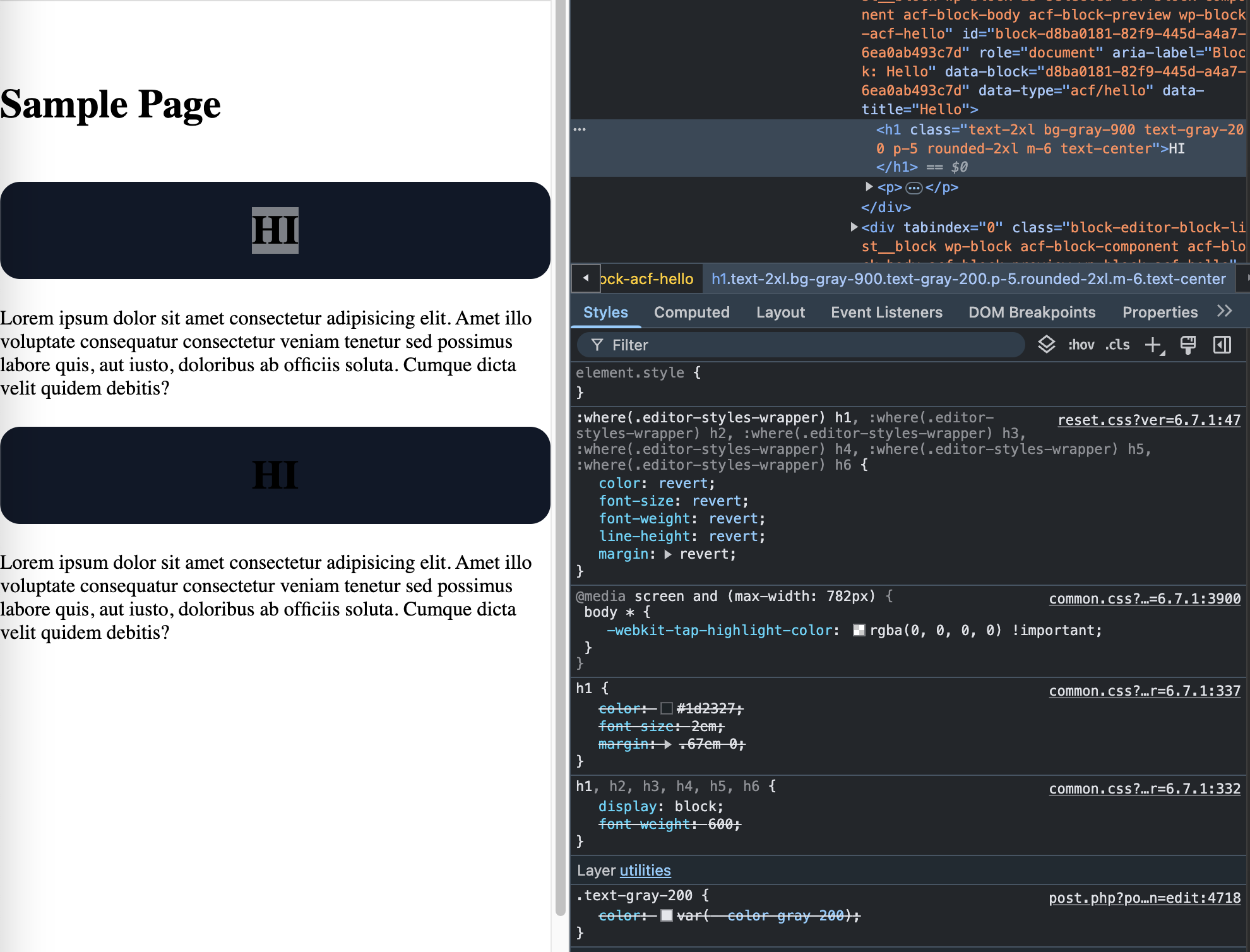
My question is: what is the preferred way to handle this?
Im sure i could setup a post css plugin to wrap all the utilities - but that seemed like potential overkill.
The solution I have been working with currently is:
```
// deregister scripts
add_action( 'enqueue_block_editor_assets', function (){
$to_deregister = [
'wp-reset-editor-styles',
'common',
];
foreach ($to_deregister as $handle) {
wp_deregister_style($handle);
}
});
// add inline styles with layers
add_action('admin_enqueue_scripts', function () {
$files = [
[
'name' => 'reset',
'type' => 'css',
'path' => ABSPATH . 'wp-includes/css/dist/block-library/reset.css'
],
[
'name' => 'common',
'type' => 'css',
'path' => ABSPATH . 'wp-admin/css/common.css'
],
];
foreach ($files as $file) {
$css = @file_get_contents($file['path']);
echo '';
echo '';
}
});
```
_ **Anyone got a better way / see problems with this approach?** _
---
## Post 2 by @ben — 2025-02-20T18:35:51Z
I don’t think you’re using the iframed editor based on what you’ve shown
Is your ACF block set to use v3 of the block API?
---
## Post 3 by @drbroad — 2025-02-20T20:12:07Z
I could be mistaken, but ACF Composer allows us to update the blockVersion - but not the api version :
>
@Log1x would be able to clarify that one
---
## Post 4 by @ben — 2025-02-20T20:24:31Z
[Reminder to read our guidelines](https://discourse.roots.io/t/how-to-best-ask-questions-on-this-forum/24582) and be upfront about what your setup is like — it’s important to know off the bat that you’re using ACF Composer.
Have you looked into what it might look like to contribute support for that in ACF Composer?
---
## Post 5 by @ben — 2025-02-20T20:24:34Z
---
## Post 6 by @drbroad — 2025-02-20T20:42:46Z
@ben Well, i did mention that I was using ACF composer in the 2nd paragraph of my initial post - i just didn’t add that tag.
Sorry about that.
---
## Post 7 by @ben — 2025-02-20T20:57:23Z
You’re right, I misread that.
If you manually change the `api_version` to 3, are you seeing the same behavior for your block?
---
## Post 8 by @drbroad — 2025-02-20T21:01:09Z
@ben After changing that manually, it works.
I apologize - i had just worked out by deduction that the only changes to my latest setup compared to my previous install, was the latest Sage theme.
I never thought to check the block version until you mentioned it - Ill be submitting a PR to that repo later today to change the API version from within the block generated by ACF Composer.
Thanks for your help!
---
## Post 9 by @ben — 2025-02-20T21:05:46Z
I’m sure Brandon will appreciate the PR :pray:
But based on this post, it feels like there’s still something we need to figure out when someone adds a v2 block to the editor. Will at least mention this gotcha in the docs at a minimum. Thank you for reporting this, and we definitely want to know if there’s anything else you run into while building with Sage 11.
---
## Post 10 by @Liskownik — 2025-02-22T13:11:46Z
I have same problem with layers. Clean installation, without any plugins, just sage 11 out of the box.
Editor is with iframe, I have only default v3 blocks.
All styles from app.css/editor.css is overridden by other styles without layers.
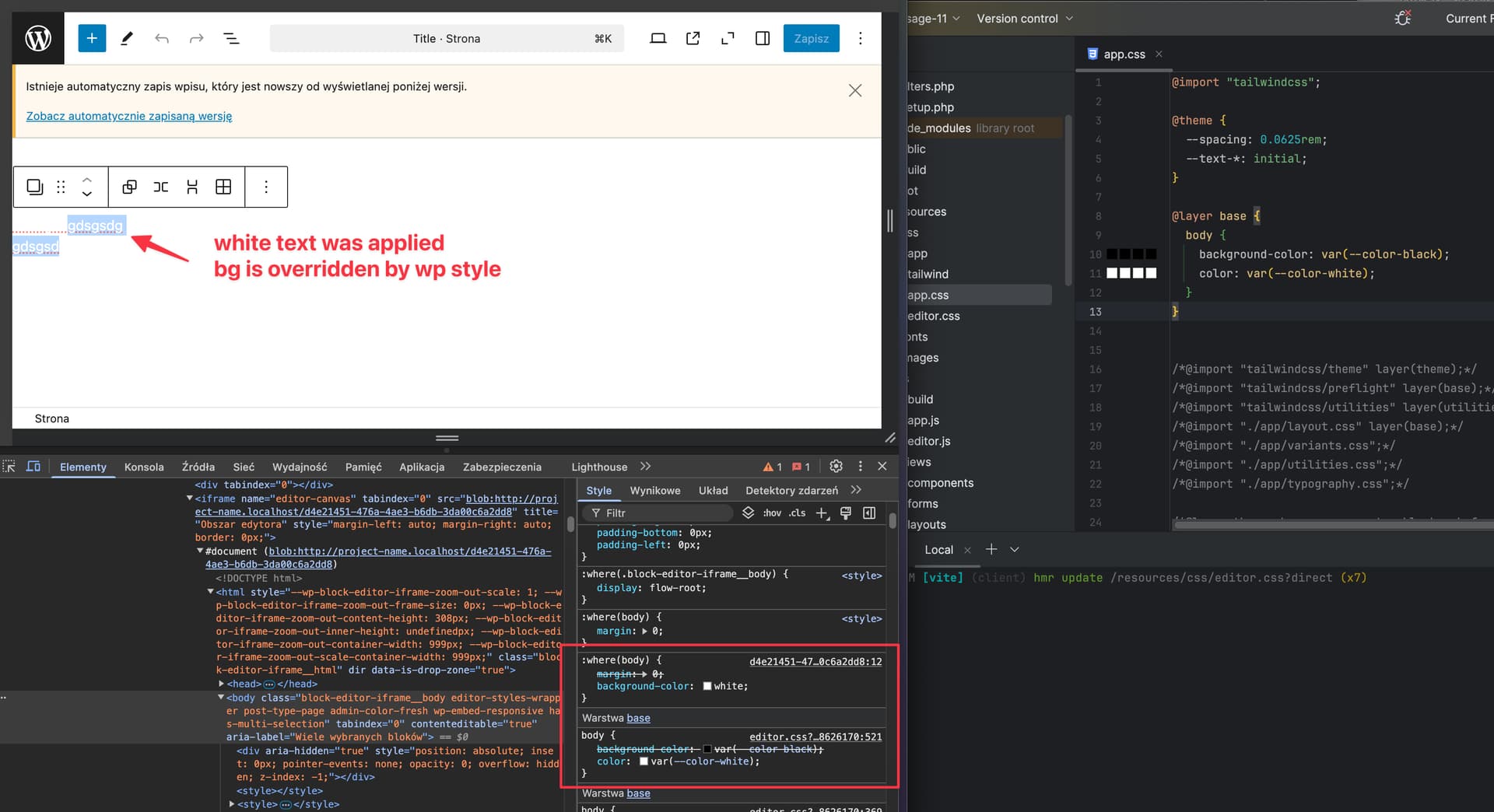
Unfortunately css doesn’t allow you to change the order so that unassigned styles come before layers, which is really stupid. For now I’ll probably try the solution above
---
## Post 11 by @ben — 2025-02-22T15:10:55Z
> just sage 11 out of the box.
No it ain’t :smiley:
What’s up with your editor showing `app.css` on the right in your screenshot? How’s that relevant to editor styles? If you’re wanting to style the editor, you should be modifying `editor.css`
Give us some code that shows us how to reproduce what you’re discussing, because “sage 11 out of the box” implies you’ve made no changes
This topic was originally about the editor not being iframed, which isn’t what you’re running into. Please make a new topic with all the relevant details
---
## Post 12 by @Log1x — 2025-02-22T15:20:05Z
Chiming in with an alternative solution to the above. With this stylesheet only being loaded in the editor, I’d possibly lean towards [Styling with utility classes - Core concepts - Tailwind CSS](https://tailwindcss.com/docs/styling-with-utility-classes#using-the-important-flag) and never think about a specificity issue again.
---
## Post 13 by @Liskownik — 2025-02-22T16:04:47Z
You are right, I added a few lines in css and import app.css in editor.css. I created a new topic with a more extensive description :wink: