# TASK [deploy : Fail if composer.json not found]
**URL:** https://discourse.roots.io/t/task-deploy-fail-if-composer-json-not-found/5705
**Category:** bedrock
**Tags:** deploys
**Created:** 2016-01-15T23:30:01Z
**Posts:** 12
## Post 1 by @ren — 2016-01-15T23:30:01Z
Everytime I try to deploy using:
cd ~/sites/shenmueis.com/ansible && ./deploy.sh production [shenmueis.com](http://shenmueis.com)
I get this error:
```
`fatal: [104.131.35.28]: FAILED! => {"changed": false, "failed": true, "msg": "Unable to find a `composer.json` file in the root of '/srv/www/shenmueis.com/releases/20160115224439'. Make sure your repo has a `composer.json` file in its root or edit `repo_subtree_path` for 'shenmueis.com' in `wordpress_sites.yml` so it points to the directory with a `composer.json` file."}`
```
Could this be related?
```
TASK [Verify remote repo] ******************************************************
ok: [104.131.35.28]
[WARNING]: Consider using git module rather than running git
```
Here is the wordpress\_sites.yml
```
# Documentation: https://roots.io/trellis/docs/remote-server-setup/
wordpress_sites:
shenmueis.com:
site_hosts:
- shenmueis.com
- 104.131.35.28
local_path: ../site # path targeting local Bedrock site directory (relative to Ansible root)
repo: git@github.com:rukawaxz/shenmueis2.git
branch: master
repo_subtree_path: site
#repo_subtree_path: site # relative path to your Bedrock/WP directory in your repo (above) if it is not the root (like the roots-example-project structure)
permalink_structure: "/%postname%/"
multisite:
enabled: false
subdomains: false
ssl:
enabled: false
cache:
enabled: true
duration: 30s
system_cron: true
env:
disable_wp_cron: true
wp_home: http://shenmueis.com
wp_siteurl: http://shenmueis.com/wp
wp_env: production
db_name: shenmueis
db_user: shenmueis_dbuser
# Define the following variables in group_vars/production/vault.yml
# db_password:
# auth_key:
# secure_auth_key:
# logged_in_key:
# nonce_key:
# auth_salt:
# secure_auth_salt:
# logged_in_salt:
# nonce_salt:
```
Here is the results after running
cd ~/sites/shenmueis.com/ansible && ./deploy.sh production [shenmueis.com](http://shenmueis.com)
```
Christians-MacBook-Pro:ansible christianlaborde$ cd ~/sites/shenmueis.com/ansible && ./deploy.sh production shenmueis.com
PLAY [Ensure necessary variables are defined] **********************************
TASK [Ensure environment is defined] *******************************************
skipping: [localhost]
PLAY [Deploy WP site] **********************************************************
TASK [setup] *******************************************************************
ok: [104.131.35.28]
TASK [Ensure site is valid] ****************************************************
skipping: [104.131.35.28]
TASK [Ensure repo is valid] ****************************************************
skipping: [104.131.35.28]
TASK [Verify remote repo] ******************************************************
ok: [104.131.35.28]
[WARNING]: Consider using git module rather than running git
TASK [Failed connection to remote repo] ****************************************
skipping: [104.131.35.28]
TASK [deploy : include] ********************************************************
TASK [deploy : include] ********************************************************
included: /Users/christianlaborde/sites/shenmueis.com/ansible/roles/deploy/tasks/initialize.yml for 104.131.35.28
TASK [deploy : include] ********************************************************
TASK [deploy : Initialize] *****************************************************
ok: [104.131.35.28]
TASK [deploy : include] ********************************************************
TASK [deploy : include] ********************************************************
included: /Users/christianlaborde/sites/shenmueis.com/ansible/roles/deploy/tasks/update.yml for 104.131.35.28
TASK [deploy : include] ********************************************************
TASK [deploy : Check whether project source path is a git repo] ****************
ok: [104.131.35.28]
TASK [deploy : Get current git remote URL] *************************************
ok: [104.131.35.28]
TASK [deploy : Update git remote URL] ******************************************
skipping: [104.131.35.28]
TASK [deploy : Clone project files] ********************************************
ok: [104.131.35.28]
TASK [deploy : include] ********************************************************
TASK [deploy : include] ********************************************************
included: /Users/christianlaborde/sites/shenmueis.com/ansible/roles/deploy/tasks/prepare.yml for 104.131.35.28
TASK [deploy : include] ********************************************************
TASK [deploy : write unfinished file] ******************************************
changed: [104.131.35.28]
TASK [deploy : Check for project repo subtree] *********************************
ok: [104.131.35.28]
TASK [deploy : Fail if repo_subtree_path is set incorrectly] *******************
skipping: [104.131.35.28]
TASK [deploy : Create new release dir] *****************************************
changed: [104.131.35.28]
TASK [deploy : Run git archive to populate new build dir] **********************
skipping: [104.131.35.28]
TASK [deploy : Run git archive with subdirectory to populate new build dir] ****
changed: [104.131.35.28]
TASK [deploy : include] ********************************************************
TASK [deploy : include] ********************************************************
included: /Users/christianlaborde/sites/shenmueis.com/ansible/roles/deploy/tasks/build.yml for 104.131.35.28
TASK [deploy : include] ********************************************************
TASK [deploy : Copy project templates] *****************************************
changed: [104.131.35.28] => (item={u'dest': u'.env', u'src': u'roles/deploy/templates/env.j2', u'name': u'.env config'})
TASK [deploy : Check if project folders exist] *********************************
ok: [104.131.35.28] => (item=vendor)
TASK [deploy : Copy project folders] *******************************************
skipping: [104.131.35.28] => (item={'invocation': {'module_name': u'stat', u'module_args': {u'checksum_algorithm': u'sha1', u'get_md5': True, u'follow': False, u'get_checksum': True, u'path': u'/srv/www/shenmueis.com/current/vendor'}}, 'item': u'vendor', u'stat': {u'exists': False}, u'changed': False, '_ansible_no_log': False})
TASK [deploy : include] ********************************************************
[DEPRECATION WARNING]: You should not specify tags in the include parameters. All tags should be specified using the task-level option. This feature will be
removed in a future release. Deprecation warnings can be disabled by setting deprecation_warnings=False in ansible.cfg.
included: /Users/christianlaborde/sites/shenmueis.com/ansible/roles/deploy/hooks/build-after.yml for 104.131.35.28
TASK [deploy : Check for composer.json in project root or project_subtree_path]
ok: [104.131.35.28]
TASK [deploy : Fail if composer.json not found] ********************************
fatal: [104.131.35.28]: FAILED! => {"changed": false, "failed": true, "msg": "Unable to find a `composer.json` file in the root of '/srv/www/shenmueis.com/releases/20160115232358'. Make sure your repo has a `composer.json` file in its root or edit `repo_subtree_path` for 'shenmueis.com' in `wordpress_sites.yml` so it points to the directory with a `composer.json` file."}
PLAY RECAP *********************************************************************
104.131.35.28 : ok=18 changed=4 unreachable=0 failed=1
localhost : ok=0 changed=0 unreachable=0 failed=0
```
---
## Post 2 by @swalkinshaw — 2016-01-15T23:52:20Z
Did you read the error message that you posted?
I added that task specifically to add a helpful error message just for this case.
> Unable to find a `composer.json` file in the root of ‘/srv/www/shenmueis.com/releases/20160115224439’. Make sure your repo has a `composer.json` file in its root or edit `repo_subtree_path` for ‘[shenmueis.com](http://shenmueis.com)’ in `wordpress_sites.yml` so it points to the directory with a `composer.json` file."
You have `repo_subtree_path` set twice. Once commented out and once not. You don’t need that setting with your repo structure.
---
## Post 3 by @ren — 2016-01-16T00:30:55Z
```
wordpress_sites:
shenmueis.com:
site_hosts:
- shenmueis.com
- 104.131.35.28
local_path: ../site # path targeting local Bedrock site directory (relative to Ansible root)
repo: git@github.com:rukawaxz/shenmueis2.git
branch: master
permalink_structure: "/%postname%/"
multisite:
enabled: false
subdomains: false
ssl:
enabled: false
cache:
enabled: true
duration: 30s
system_cron: true
env:
disable_wp_cron: true
wp_home: http://shenmueis.com
wp_siteurl: http://shenmueis.com/wp
wp_env: production
db_name: shenmueis
db_user: shenmueis_dbuser
```
Ok I removed repo\_subtree\_path
I still get same error:
```
TASK [deploy : Fail if composer.json not found] ********************************
fatal: [104.131.35.28]: FAILED! => {"changed": false, "failed": true, "msg": "Unable to find a `composer.json` file in the root of '/srv/www/shenmueis.com/releases/20160116002337'. Make sure your repo has a `composer.json` file in its root or edit `repo_subtree_path` for 'shenmueis.com' in `wordpress_sites.yml` so it points to the directory with a `composer.json` file."}
```
What did I did wrong? why it can’t find composer.json` ?
I can see the composer.json file here at my repo
> **[rukawaxz/shenmueis2](https://github.com/rukawaxz/shenmueis2)**
>
> Contribute to shenmueis2 development by creating an account on GitHub.
Sorry this is my first time doing this.
---
## Post 4 by @swalkinshaw — 2016-01-16T03:27:39Z
Next debugging step would be to SSH into the server and check what’s in `/srv/www/shenmueis.com/releases/20160116002337`. It should look like repo so if it doesn’t something else is going wrong.
---
## Post 5 by @ren — 2016-01-16T07:12:01Z
This is what it was inside error.log
maybe this is useful?
```
2016/01/15 11:15:01 [crit] 25769#25769: *1 realpath() "/srv/www/shenmueis.com/current/web" failed (2: No such file or directory), client: 108.162.219.172, server: shenmueis.com, request: "GET /wp/wp-cron.php HTTP/1.1", host: "shenmueis.com"
2016/01/15 11:15:01 [crit] 25769#25769: *1 connect() to unix:/var/run/php5-fpm-wordpress.sock failed (2: No such file or directory) while connecting to upstream, client: 108.162.219.172, server: shenmueis.com, request: "GET /wp/wp-cron.php HTTP/1.1", upstream: "fastcgi://unix:/var/run/php5-fpm-wordpress.sock:", host: "shenmueis.com"
2016/01/15 11:30:01 [crit] 25769#25769: *4 realpath() "/srv/www/shenmueis.com/current/web" failed (2: No such file or directory), client: 108.162.219.172, server: shenmueis.com, request: "GET /wp/wp-cron.php HTTP/1.1", host: "shenmueis.com"
2016/01/15 11:30:01 [crit] 25769#25769: *4 connect() to unix:/var/run/php5-fpm-wordpress.sock failed (2: No such file or directory) while connecting to upstream, client: 108.162.219.172, server: shenmueis.com, request: "GET /wp/wp-cron.php HTTP/1.1", upstream: "fastcgi://unix:/var/run/php5-fpm-wordpress.sock:", host: "shenmueis.com"
2016/01/15 11:45:01 [crit] 25769#25769: *7 realpath() "/srv/www/shenmueis.com/current/web" failed (2: No such file or directory), client: 108.162.219.172, server: shenmueis.com, request: "GET /wp/wp-cron.php HTTP/1.1", host: "shenmueis.com"
2016/01/15 11:45:01 [crit] 25769#25769: *7 connect() to unix:/var/run/php5-fpm-wordpress.sock failed (2: No such file or directory) while connecting to upstream, client: 108.162.219.172, server: shenmueis.com, request: "GET /wp/wp-cron.php HTTP/1.1", upstream: "fastcgi://unix:/var/run/php5-fpm-wordpress.sock:", host: "shenmueis.com"
2016/01/15 12:00:01 [crit] 25769#25769: *13 realpath() "/srv/www/shenmueis.com/current/web" failed (2: No such file or directory), client: 108.162.219.172, server: shenmueis.com, request: "GET /wp/wp-cron.php HTTP/1.1", host: "shenmueis.com"
2016/01/15 12:00:01 [crit] 25769#25769: *13 connect() to unix:/var/run/php5-fpm-wordpress.sock failed (2: No such file or directory) while connecting to upstream, client: 108.162.219.172, server: shenmueis.com, request: "GET /wp/wp-cron.php HTTP/1.1", upstream: "fastcgi://unix:/var/run/php5-fpm-wordpress.sock:", host: "shenmueis.com"
2016/01/15 12:15:01 [crit] 25769#25769: *16 realpath() "/srv/www/shenmueis.com/current/web" failed (2: No such file or directory), client: 108.162.219.172, server: shenmueis.com, request: "GET /wp/wp-cron.php HTTP/1.1", host: "shenmueis.com"
2016/01/15 12:15:01 [crit] 25769#25769: *16 connect() to unix:/var/run/php5-fpm-wordpress.sock failed (2: No such file or directory) while connecting to upstream, client: 108.162.219.172, server: shenmueis.com, request: "GET /wp/wp-cron.php HTTP/1.1", upstream: "fastcgi://unix:/var/run/php5-fpm-wordpress.sock:", host: "shenmueis.com"
2016/01/15 12:30:01 [crit] 25769#25769: *20 realpath() "/srv/www/shenmueis.com/current/web" failed (2: No such file or directory), client: 108.162.219.172, server: shenmueis.com, request: "GET /wp/wp-cron.php HTTP/1.1", host: "shenmueis.com"
2016/01/15 12:30:01 [crit] 25769#25769: *20 connect() to unix:/var/run/php5-fpm-wordpress.sock failed (2: No such file or directory) while connecting to upstream, client: 108.162.219.172, server: shenmueis.com, request: "GET /wp/wp-cron.php HTTP/1.1", upstream: "fastcgi://unix:/var/run/php5-fpm-wordpress.sock:", host: "shenmueis.com"
2016/01/15 12:45:01 [crit] 25769#25769: *22 realpath() "/srv/www/shenmueis.com/current/web" failed (2: No such file or directory), client: 108.162.219.172, server: shenmueis.com, request: "GET /wp/wp-cron.php HTTP/1.1", host: "shenmueis.com"
2016/01/15 12:45:01 [crit] 25769#25769: *22 connect() to unix:/var/run/php5-fpm-wordpress.sock failed (2: No such file or directory) while connecting to upstream, client: 108.162.219.172, server: shenmueis.com, request: "GET /wp/wp-cron.php HTTP/1.1", upstream: "fastcgi://unix:/var/run/php5-fpm-wordpress.sock:", host: "shenmueis.com"
2016/01/15 13:00:01 [crit] 25769#25769: *25 realpath() "/srv/www/shenmueis.com/current/web" failed (2: No such file or directory), client: 108.162.219.172, server: shenmueis.com, request: "GET /wp/wp-cron.php HTTP/1.1", host: "shenmueis.com"
2016/01/15 13:00:01 [crit] 25769#25769: *25 connect() to unix:/var/run/php5-fpm-wordpress.sock failed (2: No such file or directory) while connecting to upstream, client: 108.162.219.172, server: shenmueis.com, request: "GET /wp/wp-cron.php HTTP/1.1", upstream: "fastcgi://unix:/var/run/php5-fpm-wordpress.sock:", host: "shenmueis.com"
2016/01/15 13:15:01 [crit] 25769#25769: *30 realpath() "/srv/www/shenmueis.com/current/web" failed (2: No such file or directory), client: 108.162.219.172, server: shenmueis.com, request: "GET /wp/wp-cron.php HTTP/1.1", host: "shenmueis.com"
2016/01/15 13:15:01 [crit] 25769#25769: *30 connect() to unix:/var/run/php5-fpm-wordpress.sock failed (2: No such file or directory) while connecting to upstream, client: 108.162.219.172, server: shenmueis.com, request: "GET /wp/wp-cron.php HTTP/1.1", upstream: "fastcgi://unix:/var/run/php5-fpm-wordpress.sock:", host: "shenmueis.com"
2016/01/15 13:28:01 [crit] 25769#25769: *33 realpath() "/srv/www/shenmueis.com/current/web" failed (2: No such file or directory), client: 173.245.50.219, server: shenmueis.com, request: "GET /feed/ HTTP/1.1", host: "shenmueis.com"
2016/01/15 13:28:01 [crit] 25769#25769: *33 connect() to unix:/var/run/php5-fpm-wordpress.sock failed (2: No such file or directory) while connecting to upstream, client: 173.245.50.219, server: shenmueis.com, request: "GET /feed/ HTTP/1.1", upstream: "fastcgi://unix:/var/run/php5-fpm-wordpress.sock:", host: "shenmueis.com"
2016/01/15 13:30:02 [crit] 25769#25769: *37 realpath() "/srv/www/shenmueis.com/current/web" failed (2: No such file or directory), client: 108.162.219.172, server: shenmueis.com, request: "GET /wp/wp-cron.php HTTP/1.1", host: "shenmueis.com"
2016/01/15 13:30:02 [crit] 25769#25769: *37 connect() to unix:/var/run/php5-fpm-wordpress.sock failed (2: No such file or directory) while connecting to upstream, client: 108.162.219.172, server: shenmueis.com, request: "GET /wp/wp-cron.php HTTP/1.1", upstream: "fastcgi://unix:/var/run/php5-fpm-wordpress.sock:", host: "shenmueis.com"
2016/01/15 13:45:01 [crit] 25769#25769: *39 realpath() "/srv/www/shenmueis.com/current/web" failed (2: No such file or directory), client: 108.162.219.172, server: shenmueis.com, request: "GET /wp/wp-cron.php HTTP/1.1", host: "shenmueis.com"
2016/01/15 13:45:01 [crit] 25769#25769: *39 connect() to unix:/var/run/php5-fpm-wordpress.sock failed (2: No such file or directory) while connecting to upstream, client: 108.162.219.172, server: shenmueis.com, request: "GET /wp/wp-cron.php HTTP/1.1", upstream: "fastcgi://unix:/var/run/php5-fpm-wordpress.sock:", host: "shenmueis.com"
2016/01/15 14:00:01 [crit] 25769#25769: *41 realpath() "/srv/www/shenmueis.com/current/web" failed (2: No such file or directory), client: 108.162.219.172, server: shenmueis.com, request: "GET /wp/wp-cron.php HTTP/1.1", host: "shenmueis.com"
2016/01/15 14:00:01 [crit] 25769#25769: *41 connect() to unix:/var/run/php5-fpm-wordpress.sock failed (2: No such file or directory) while connecting to upstream, client: 108.162.219.172, server: shenmueis.com, request: "GET /wp/wp-cron.php HTTP/1.1", upstream: "fastcgi://unix:/var/run/php5-fpm-wordpress.sock:", host: "shenmueis.com"
2016/01/15 14:15:02 [crit] 25769#25769: *43 realpath() "/srv/www/shenmueis.com/current/web" failed (2: No such file or directory), client: 108.162.219.172, server: shenmueis.com, request: "GET /wp/wp-cron.php HTTP/1.1", host: "shenmueis.com"
2016/01/15 14:15:02 [crit] 25769#25769: *43 connect() to unix:/var/run/php5-fpm-wordpress.sock failed (2: No such file or directory) while connecting to upstream, client: 108.162.219.172, server: shenmueis.com, request: "GET /wp/wp-cron.php HTTP/1.1", upstream: "fastcgi://unix:/var/run/php5-fpm-wordpress.sock:", host: "shenmueis.com"
2016/01/15 14:30:01 [crit] 25769#25769: *46 realpath() "/srv/www/shenmueis.com/current/web" failed (2: No such file or directory), client: 108.162.219.172, server: shenmueis.com, request: "GET /wp/wp-cron.php HTTP/1.1", host: "shenmueis.com"
2016/01/15 14:30:01 [crit] 25769#25769: *46 connect() to unix:/var/run/php5-fpm-wordpress.sock failed (2: No such file or directory) while connecting to upstream, client: 108.162.219.172, server: shenmueis.com, request: "GET /wp/wp-cron.php HTTP/1.1", upstream: "fastcgi://unix:/var/run/php5-fpm-wordpress.sock:", host: "shenmueis.com"
2016/01/15 14:45:01 [crit] 25769#25769: *50 realpath() "/srv/www/shenmueis.com/current/web" failed (2: No such file or directory), client: 108.162.219.172, server: shenmueis.com, request: "GET /wp/wp-cron.php HTTP/1.1", host: "shenmueis.com"
2016/01/15 14:45:01 [crit] 25769#25769: *50 connect() to unix:/var/run/php5-fpm-wordpress.sock failed (2: No such file or directory) while connecting to upstream, client: 108.162.219.172, server: shenmueis.com, request: "GET /wp/wp-cron.php HTTP/1.1", upstream: "fastcgi://unix:/var/run/php5-fpm-wordpress.sock:", host: "shenmueis.com"
2016/01/15 15:00:01 [crit] 25769#25769: *53 realpath() "/srv/www/shenmueis.com/current/web" failed (2: No such file or directory), client: 108.162.219.172, server: shenmueis.com, request: "GET /wp/wp-cron.php HTTP/1.1", host: "shenmueis.com"
2016/01/15 15:00:01 [crit] 25769#25769: *53 connect() to unix:/var/run/php5-fpm-wordpress.sock failed (2: No such file or directory) while connecting to upstream, client: 108.162.219.172, server: shenmueis.com, request: "GET /wp/wp-cron.php HTTP/1.1", upstream: "fastcgi://unix:/var/run/php5-fpm-wordpress.sock:", host: "shenmueis.com"
2016/01/15 15:15:01 [crit] 25769#25769: *56 realpath() "/srv/www/shenmueis.com/current/web" failed (2: No such file or directory), client: 108.162.219.172, server: shenmueis.com, request: "GET /wp/wp-cron.php HTTP/1.1", host: "shenmueis.com"
2016/01/15 15:15:01 [crit] 25769#25769: *56 connect() to unix:/var/run/php5-fpm-wordpress.sock failed (2: No such file or directory) while connecting to upstream, client: 108.162.219.172, server: shenmueis.com, request: "GET /wp/wp-cron.php HTTP/1.1", upstream: "fastcgi://unix:/var/run/php5-fpm-wordpress.sock:", host: "shenmueis.com"
2016/01/15 15:30:02 [crit] 25769#25769: *58 realpath() "/srv/www/shenmueis.com/current/web" failed (2: No such file or directory), client: 108.162.219.172, server: shenmueis.com, request: "GET /wp/wp-cron.php HTTP/1.1", host: "shenmueis.com"
2016/01/15 15:30:02 [crit] 25769#25769: *58 connect() to unix:/var/run/php5-fpm-wordpress.sock failed (2: No such file or directory) while connecting to upstream, client: 108.162.219.172, server: shenmueis.com, request: "GET /wp/wp-cron.php HTTP/1.1", upstream: "fastcgi://unix:/var/run/php5-fpm-wordpress.sock:", host: "shenmueis.com"
2016/01/15 15:45:02 [crit] 25769#25769: *60 realpath() "/srv/www/shenmueis.com/current/web" failed (2: No such file or directory), client: 108.162.219.172, server: shenmueis.com, request: "GET /wp/wp-cron.php HTTP/1.1", host: "shenmueis.com"
2016/01/15 15:45:02 [crit] 25769#25769: *60 connect() to unix:/var/run/php5-fpm-wordpress.sock failed (2: No such file or directory) while connecting to upstream, client: 108.162.219.172, server: shenmueis.com, request: "GET /wp/wp-cron.php HTTP/1.1", upstream: "fastcgi://unix:/var/run/php5-fpm-wordpress.sock:", host: "shenmueis.com"
2016/01/15 16:00:01 [crit] 25769#25769: *62 realpath() "/srv/www/shenmueis.com/current/web" failed (2: No such file or directory), client: 108.162.219.172, server: shenmueis.com, request: "GET /wp/wp-cron.php HTTP/1.1", host: "shenmueis.com"
2016/01/15 16:00:01 [crit] 25769#25769: *62 connect() to unix:/var/run/php5-fpm-wordpress.sock failed (2: No such file or directory) while connecting to upstream, client: 108.162.219.172, server: shenmueis.com, request: "GET /wp/wp-cron.php HTTP/1.1", upstream: "fastcgi://unix:/var/run/php5-fpm-wordpress.sock:", host: "shenmueis.com"
2016/01/15 16:15:02 [crit] 25769#25769: *88 realpath() "/srv/www/shenmueis.com/current/web" failed (2: No such file or directory), client: 108.162.219.172, server: shenmueis.com, request: "GET /wp/wp-cron.php HTTP/1.1", host: "shenmueis.com"
2016/01/15 16:15:02 [error] 25769#25769: *88 FastCGI sent in stderr: "Primary script unknown" while reading response header from upstream, client: 108.162.219.172, server: shenmueis.com, request: "GET /wp/wp-cron.php HTTP/1.1", upstream: "fastcgi://unix:/var/run/php5-fpm-wordpress.sock:", host: "shenmueis.com"
2016/01/15 16:30:01 [crit] 25769#25769: *90 realpath() "/srv/www/shenmueis.com/current/web" failed (2: No such file or directory), client: 108.162.219.172, server: shenmueis.com, request: "GET /wp/wp-cron.php HTTP/1.1", host: "shenmueis.com"
2016/01/15 16:30:01 [error] 25769#25769: *90 FastCGI sent in stderr: "Primary script unknown" while reading response header from upstream, client: 108.162.219.172, server: shenmueis.com, request: "GET /wp/wp-cron.php HTTP/1.1", upstream: "fastcgi://unix:/var/run/php5-fpm-wordpress.sock:", host: "shenmueis.com"
2016/01/15 16:45:01 [crit] 25769#25769: *92 realpath() "/srv/www/shenmueis.com/current/web" failed (2: No such file or directory), client: 108.162.219.172, server: shenmueis.com, request: "GET /wp/wp-cron.php HTTP/1.1", host: "shenmueis.com"
2016/01/15 16:45:01 [error] 25769#25769: *92 FastCGI sent in stderr: "Primary script unknown" while reading response header from upstream, client: 108.162.219.172, server: shenmueis.com, request: "GET /wp/wp-cron.php HTTP/1.1", upstream: "fastcgi://unix:/var/run/php5-fpm-wordpress.sock:", host: "shenmueis.com"
2016/01/15 17:00:03 [crit] 25769#25769: *97 realpath() "/srv/www/shenmueis.com/current/web" failed (2: No such file or directory), client: 108.162.219.172, server: shenmueis.com, request: "GET /wp/wp-cron.php HTTP/1.1", host: "shenmueis.com"
2016/01/15 17:00:03 [error] 25769#25769: *97 FastCGI sent in stderr: "Primary script unknown" while reading response header from upstream, client: 108.162.219.172, server: shenmueis.com, request: "GET /wp/wp-cron.php HTTP/1.1", upstream: "fastcgi://unix:/var/run/php5-fpm-wordpress.sock:", host: "shenmueis.com"
2016/01/15 17:15:01 [crit] 25769#25769: *102 realpath() "/srv/www/shenmueis.com/current/web" failed (2: No such file or directory), client: 108.162.219.172, server: shenmueis.com, request: "GET /wp/wp-cron.php HTTP/1.1", host: "shenmueis.com"
2016/01/15 17:15:01 [error] 25769#25769: *102 FastCGI sent in stderr: "Primary script unknown" while reading response header from upstream, client: 108.162.219.172, server: shenmueis.com, request: "GET /wp/wp-cron.php HTTP/1.1", upstream: "fastcgi://unix:/var/run/php5-fpm-wordpress.sock:", host: "shenmueis.com"
2016/01/15 17:30:07 [crit] 25769#25769: *105 realpath() "/srv/www/shenmueis.com/current/web" failed (2: No such file or directory), client: 108.162.219.172, server: shenmueis.com, request: "GET /wp/wp-cron.php HTTP/1.1", host: "shenmueis.com"
2016/01/15 17:30:07 [error] 25769#25769: *105 FastCGI sent in stderr: "Primary script unknown" while reading response header from upstream, client: 108.162.219.172, server: shenmueis.com, request: "GET /wp/wp-cron.php HTTP/1.1", upstream: "fastcgi://unix:/var/run/php5-fpm-wordpress.sock:", host: "shenmueis.com"
2016/01/15 17:45:01 [crit] 25769#25769: *107 realpath() "/srv/www/shenmueis.com/current/web" failed (2: No such file or directory), client: 108.162.219.172, server: shenmueis.com, request: "GET /wp/wp-cron.php HTTP/1.1", host: "shenmueis.com"
2016/01/15 17:45:01 [error] 25769#25769: *107 FastCGI sent in stderr: "Primary script unknown" while reading response header from upstream, client: 108.162.219.172, server: shenmueis.com, request: "GET /wp/wp-cron.php HTTP/1.1", upstream: "fastcgi://unix:/var/run/php5-fpm-wordpress.sock:", host: "shenmueis.com"
2016/01/15 18:00:02 [crit] 25769#25769: *109 realpath() "/srv/www/shenmueis.com/current/web" failed (2: No such file or directory), client: 108.162.219.172, server: shenmueis.com, request: "GET /wp/wp-cron.php HTTP/1.1", host: "shenmueis.com"
2016/01/15 18:00:02 [error] 25769#25769: *109 FastCGI sent in stderr: "Primary script unknown" while reading response header from upstream, client: 108.162.219.172, server: shenmueis.com, request: "GET /wp/wp-cron.php HTTP/1.1", upstream: "fastcgi://unix:/var/run/php5-fpm-wordpress.sock:", host: "shenmueis.com"
2016/01/15 18:15:01 [crit] 25769#25769: *111 realpath() "/srv/www/shenmueis.com/current/web" failed (2: No such file or directory), client: 108.162.219.172, server: shenmueis.com, request: "GET /wp/wp-cron.php HTTP/1.1", host: "shenmueis.com"
2016/01/15 18:15:01 [error] 25769#25769: *111 FastCGI sent in stderr: "Primary script unknown" while reading response header from upstream, client: 108.162.219.172, server: shenmueis.com, request: "GET /wp/wp-cron.php HTTP/1.1", upstream: "fastcgi://unix:/var/run/php5-fpm-wordpress.sock:", host: "shenmueis.com"
2016/01/15 18:30:01 [crit] 25769#25769: *114 realpath() "/srv/www/shenmueis.com/current/web" failed (2: No such file or directory), client: 108.162.219.172, server: shenmueis.com, request: "GET /wp/wp-cron.php HTTP/1.1", host: "shenmueis.com"
2016/01/15 18:30:01 [error] 25769#25769: *114 FastCGI sent in stderr: "Primary script unknown" while reading response header from upstream, client: 108.162.219.172, server: shenmueis.com, request: "GET /wp/wp-cron.php HTTP/1.1", upstream: "fastcgi://unix:/var/run/php5-fpm-wordpress.sock:", host: "shenmueis.com"
2016/01/15 18:36:31 [crit] 25769#25769: *117 realpath() "/srv/www/shenmueis.com/current/web" failed (2: No such file or directory), client: 173.245.54.219, server: shenmueis.com, request: "GET /feed/ HTTP/1.1", host: "shenmueis.com"
2016/01/15 18:36:31 [error] 25769#25769: *117 FastCGI sent in stderr: "Primary script unknown" while reading response header from upstream, client: 173.245.54.219, server: shenmueis.com, request: "GET /feed/ HTTP/1.1", upstream: "fastcgi://unix:/var/run/php5-fpm-wordpress.sock:", host: "shenmueis.com"
2016/01/15 18:45:03 [crit] 25769#25769: *121 realpath() "/srv/www/shenmueis.com/current/web" failed (2: No such file or directory), client: 108.162.219.172, server: shenmueis.com, request: "GET /wp/wp-cron.php HTTP/1.1", host: "shenmueis.com"
2016/01/15 18:45:03 [error] 25769#25769: *121 FastCGI sent in stderr: "Primary script unknown" while reading response header from upstream, client: 108.162.219.172, server: shenmueis.com, request: "GET /wp/wp-cron.php HTTP/1.1", upstream: "fastcgi://unix:/var/run/php5-fpm-wordpress.sock:", host: "shenmueis.com"
2016/01/15 19:00:01 [crit] 25769#25769: *124 realpath() "/srv/www/shenmueis.com/current/web" failed (2: No such file or directory), client: 108.162.219.172, server: shenmueis.com, request: "GET /wp/wp-cron.php HTTP/1.1", host: "shenmueis.com"
2016/01/15 19:00:01 [error] 25769#25769: *124 FastCGI sent in stderr: "Primary script unknown" while reading response header from upstream, client: 108.162.219.172, server: shenmueis.com, request: "GET /wp/wp-cron.php HTTP/1.1", upstream: "fastcgi://unix:/var/run/php5-fpm-wordpress.sock:", host: "shenmueis.com"
2016/01/15 19:15:01 [crit] 25769#25769: *128 realpath() "/srv/www/shenmueis.com/current/web" failed (2: No such file or directory), client: 108.162.219.172, server: shenmueis.com, request: "GET /wp/wp-cron.php HTTP/1.1", host: "shenmueis.com"
2016/01/15 19:15:01 [error] 25769#25769: *128 FastCGI sent in stderr: "Primary script unknown" while reading response header from upstream, client: 108.162.219.172, server: shenmueis.com, request: "GET /wp/wp-cron.php HTTP/1.1", upstream: "fastcgi://unix:/var/run/php5-fpm-wordpress.sock:", host: "shenmueis.com"
2016/01/15 19:30:01 [crit] 25769#25769: *131 realpath() "/srv/www/shenmueis.com/current/web" failed (2: No such file or directory), client: 108.162.219.172, server: shenmueis.com, request: "GET /wp/wp-cron.php HTTP/1.1", host: "shenmueis.com"
2016/01/15 19:30:01 [error] 25769#25769: *131 FastCGI sent in stderr: "Primary script unknown" while reading response header from upstream, client: 108.162.219.172, server: shenmueis.com, request: "GET /wp/wp-cron.php HTTP/1.1", upstream: "fastcgi://unix:/var/run/php5-fpm-wordpress.sock:", host: "shenmueis.com"
2016/01/15 19:45:02 [crit] 25769#25769: *133 realpath() "/srv/www/shenmueis.com/current/web" failed (2: No such file or directory), client: 108.162.219.172, server: shenmueis.com, request: "GET /wp/wp-cron.php HTTP/1.1", host: "shenmueis.com"
2016/01/15 19:45:02 [error] 25769#25769: *133 FastCGI sent in stderr: "Primary script unknown" while reading response header from upstream, client: 108.162.219.172, server: shenmueis.com, request: "GET /wp/wp-cron.php HTTP/1.1", upstream: "fastcgi://unix:/var/run/php5-fpm-wordpress.sock:", host: "shenmueis.com"
2016/01/15 20:00:01 [crit] 25769#25769: *135 realpath() "/srv/www/shenmueis.com/current/web" failed (2: No such file or directory), client: 108.162.219.172, server: shenmueis.com, request: "GET /wp/wp-cron.php HTTP/1.1", host: "shenmueis.com"
2016/01/15 20:00:01 [error] 25769#25769: *135 FastCGI sent in stderr: "Primary script unknown" while reading response header from upstream, client: 108.162.219.172, server: shenmueis.com, request: "GET /wp/wp-cron.php HTTP/1.1", upstream: "fastcgi://unix:/var/run/php5-fpm-wordpress.sock:", host: "shenmueis.com"
2016/01/15 20:15:01 [crit] 25769#25769: *137 realpath() "/srv/www/shenmueis.com/current/web" failed (2: No such file or directory), client: 108.162.219.172, server: shenmueis.com, request: "GET /wp/wp-cron.php HTTP/1.1", host: "shenmueis.com"
2016/01/15 20:15:01 [error] 25769#25769: *137 FastCGI sent in stderr: "Primary script unknown" while reading response header from upstream, client: 108.162.219.172, server: shenmueis.com, request: "GET /wp/wp-cron.php HTTP/1.1", upstream: "fastcgi://unix:/var/run/php5-fpm-wordpress.sock:", host: "shenmueis.com"
2016/01/15 20:30:01 [crit] 25769#25769: *139 realpath() "/srv/www/shenmueis.com/current/web" failed (2: No such file or directory), client: 108.162.219.172, server: shenmueis.com, request: "GET /wp/wp-cron.php HTTP/1.1", host: "shenmueis.com"
2016/01/15 20:30:01 [error] 25769#25769: *139 FastCGI sent in stderr: "Primary script unknown" while reading response header from upstream, client: 108.162.219.172, server: shenmueis.com, request: "GET /wp/wp-cron.php HTTP/1.1", upstream: "fastcgi://unix:/var/run/php5-fpm-wordpress.sock:", host: "shenmueis.com"
2016/01/15 20:45:01 [crit] 25769#25769: *141 realpath() "/srv/www/shenmueis.com/current/web" failed (2: No such file or directory), client: 108.162.219.172, server: shenmueis.com, request: "GET /wp/wp-cron.php HTTP/1.1", host: "shenmueis.com"
2016/01/15 20:45:01 [error] 25769#25769: *141 FastCGI sent in stderr: "Primary script unknown" while reading response header from upstream, client: 108.162.219.172, server: shenmueis.com, request: "GET /wp/wp-cron.php HTTP/1.1", upstream: "fastcgi://unix:/var/run/php5-fpm-wordpress.sock:", host: "shenmueis.com"
2016/01/15 21:00:02 [crit] 25769#25769: *144 realpath() "/srv/www/shenmueis.com/current/web" failed (2: No such file or directory), client: 108.162.219.172, server: shenmueis.com, request: "GET /wp/wp-cron.php HTTP/1.1", host: "shenmueis.com"
2016/01/15 21:00:02 [error] 25769#25769: *144 FastCGI sent in stderr: "Primary script unknown" while reading response header from upstream, client: 108.162.219.172, server: shenmueis.com, request: "GET /wp/wp-cron.php HTTP/1.1", upstream: "fastcgi://unix:/var/run/php5-fpm-wordpress.sock:", host: "shenmueis.com"
2016/01/15 21:15:01 [crit] 25769#25769: *146 realpath() "/srv/www/shenmueis.com/current/web" failed (2: No such file or directory), client: 108.162.219.172, server: shenmueis.com, request: "GET /wp/wp-cron.php HTTP/1.1", host: "shenmueis.com"
2016/01/15 21:15:01 [error] 25769#25769: *146 FastCGI sent in stderr: "Primary script unknown" while reading response header from upstream, client: 108.162.219.172, server: shenmueis.com, request: "GET /wp/wp-cron.php HTTP/1.1", upstream: "fastcgi://unix:/var/run/php5-fpm-wordpress.sock:", host: "shenmueis.com"
2016/01/15 21:30:01 [crit] 25769#25769: *149 realpath() "/srv/www/shenmueis.com/current/web" failed (2: No such file or directory), client: 108.162.219.172, server: shenmueis.com, request: "GET /wp/wp-cron.php HTTP/1.1", host: "shenmueis.com"
2016/01/15 21:30:01 [error] 25769#25769: *149 FastCGI sent in stderr: "Primary script unknown" while reading response header from upstream, client: 108.162.219.172, server: shenmueis.com, request: "GET /wp/wp-cron.php HTTP/1.1", upstream: "fastcgi://unix:/var/run/php5-fpm-wordpress.sock:", host: "shenmueis.com"
```
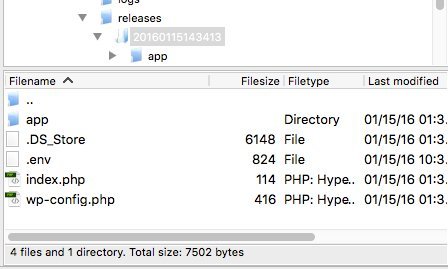
Here is screenshot of the files inside /srv/www/shenmueis.com/releases/20160116002337.
Almost all of those files only contain a file called .env
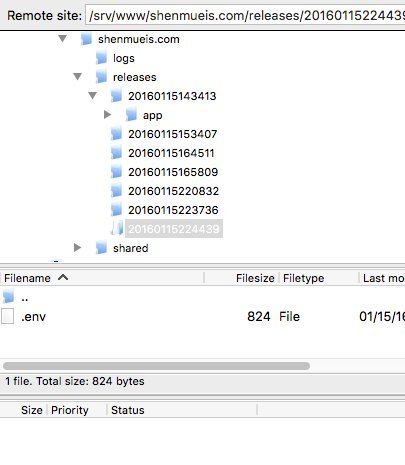
Except first one.
I used this guide to install trellis/bedrock
[http://davekiss.com/develop-wordpress-sites-like-a-goddamn-champion/](http://davekiss.com/develop-wordpress-sites-like-a-goddamn-champion/)
It was really hard to install I encountered a lot of error.Even if I was following step by step. I had to fix a lot of error using google. But this one I found no solution at all in google and trying to fix it myself for a few hours.
Even searching here I found similar problems but not the same.
Also I notice 2 people have this error.
The same thing happens to me when I visit the domain url and server ip.
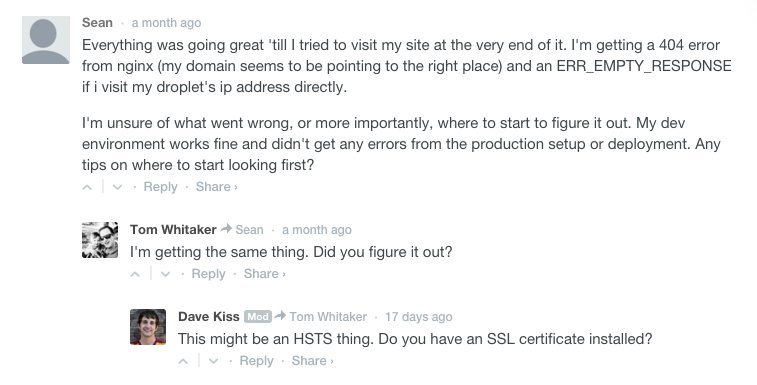
I am using digitalocean as server. Also I set the SSL as false since I don’t have one or plan to use one yet.
Is the problem maybe my files structure in github?
Is this the correct file to git?
[https://github.com/rukawaxz/shenmueis2](https://github.com/rukawaxz/shenmueis2)
I also tried to git from [example.com](http://example.com) instead of [example.com/site](http://example.com/site) so that it would use the pathway feature,but the files ended up gray.
[https://github.com/rukawaxz/shenmueis](https://github.com/rukawaxz/shenmueis)
There are very few guides online to set up trellis.
I would say I only found 5 or less. But this and another one from fatpony where the only detailed ones with step by step that I found.
I tried to use docs at first but I got confused.
Now after a lot of trial and errors I understand a lot more how it works.
I wish there was a video guide installing trellis from scratch that would be very helpful but there is none in youtube.
---
## Post 6 by @swalkinshaw — 2016-01-16T20:15:00Z
I have a hunch about what’s happening. Think you ran into a bug we had that has since been fixed.
I recently did some updates to the deploys which I’m guessing/hoping your version of Trellis doesn’t have. Here’s the specific commit: [https://github.com/roots/trellis/commit/f53b508ddd74ecfca87681aecb3f3e5dc0f13b67](https://github.com/roots/trellis/commit/f53b508ddd74ecfca87681aecb3f3e5dc0f13b67)
You could verify if you have those changes, and if not, update to get them. One easy way to get the latest Trellis is just save your config files (in `group_vars` and `hosts`) and then re-clone the repo then copy over your config files again. Assuming those are the only files you’ve edited.
---
## Post 7 by @fullyint — 2016-01-16T20:47:44Z
When I test the latest Trellis with all the defaults except adding your `repo: git@github.com:rukawaxz/shenmueis2.git` everything works successfully. (ansible 1.9.4)
> [@ren](#):
>
> It was really hard to install I encountered a lot of error…
> Now after a lot of trial and errors I understand a lot more how it works.
On occasions that people have a number of failed iterations during their first Trellis project, it seems possible to arrive at the correct setup and configs but have the provisioning still not succeed because the server has become so tangled up during all the trial and error. You might find that, like has been common for others with many failed iterations, you can just wipe the server and successfully run `server.yml` and `deploy` with your latest configs.
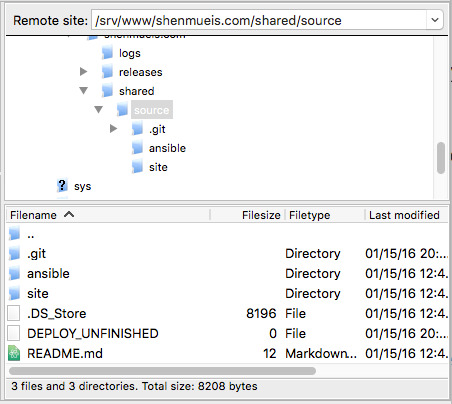
If that still doesn’t work, could you check one more thing? You replied that the `releases` directory doesn’t seem to have the files from your `rukawaxz/shenmueis2` project, but could you also check `/srv/www/shenmueis.com/shared/source` on the remote server for whether it has your project files (like `composer.json`)? If the files are there, then your repo is being cloned correctly but somehow the [`git archive`](https://github.com/roots/trellis/blob/d65b1ebaeb84e6d084ba5af0e6850786abca3c6a/roles/deploy/tasks/prepare.yml#L27) command isn’t copying them over to the releases directory.
In any case, if trying again with a fresh server doesn’t work, then with all that you’ve learned…
> [@Deploy issue ansible 1.9.4 composer not found](https://discourse.roots.io/t/deploy-issue-ansible-1-9-4-composer-not-found/5595/14):
>
> …my next recommendation would be to see if you can get a vanilla trellis clone to work, making essentially no modifications other than your server IP and domain name. Compared to the long hard road of starting with a bunch of customizations and trying to get Trellis to work, it seems like a quick and easy road to get Trellis working with its defaults so that you know that your environment is ready and only then adding in customizations a piece at a time.
I think if you make a fresh clone of the latest Trellis you’ll understand enough now to work through the setup steps in the README and have a successful provision and deploy.
One supporting argument for cloning the latest Trellis and working from its [README](https://github.com/roots/trellis/blob/master/README.md) and the [Trellis docs](https://roots.io/trellis/docs/) are that they will be up to date. I skimmed over the setup tutorial you linked to and it looked pretty good but I noticed at least one item that was out-of-date related to [ssh keys](http://davekiss.com/develop-wordpress-sites-like-a-goddamn-champion/#connectingyourgithubaccount) (`github_ssh_keys` was replaced with `users` [6 months ago](https://github.com/roots/trellis/pull/247); more info in [ssh-keys docs](https://roots.io/trellis/docs/ssh-keys/)).
---
## Post 8 by @ren — 2016-01-17T07:55:26Z
\![]() {"changed": false, "failed": true, "module_stderr": "", "module_stdout": "Traceback (most recent call last):\r\n File \"/home/web/.ansible/tmp/ansible-tmp-1453015482.22-253564890305789/deploy_helper\", line 2409, in \r\n main()\r\n File \"/home/web/.ansible/tmp/ansible-tmp-1453015482.22-253564890305789/deploy_helper\", line 450, in main\r\n changes += deploy_helper.remove_unfinished_link(facts['path'])\r\nKeyError: 'path'\r\n", "msg": "MODULE FAILURE", "parsed": false}
```
Should I be concerned or ignore that error since the site is working fine?
---
## Post 9 by @fullyint — 2016-01-17T08:16:15Z
> [@ren](#):
>
> I reinstall and this time the deployed worked and the site is running.
@ren Congratulations!
The failed “Finalize the deploy” task will most likely be a problem so you should probably downgrade your Ansible to 1.9.4 and run `deploy.yml` again. Hopefully Ansible will update the deploy\_helper module soon (see notes in [roots/trellis#469](https://github.com/roots/trellis/issues/469)). @swalkinshaw added [a note](https://github.com/roots/trellis/commit/d65b1ebaeb84e6d084ba5af0e6850786abca3c6a) to the README to this effect.
---
## Post 10 by @ren — 2016-01-19T04:54:00Z
I updated Ansible and there is no error.
Thank you @fullyint and @swalkinshaw is working perfectly now.
Its really amazing everything trellis can do.
I was planning to test other similar system for deployment but they can’t compare to everything trellis can do…
---
## Post 11 by @swalkinshaw — 2016-01-19T05:18:30Z
Glad you got it all working and thanks for working through a bug :slightly_smiling:
---
## Post 12 by @mZoo — 2016-05-18T21:16:37Z
Came across this myself and wanted to mention 1, also copy your `.vault_pass` file before replacing the repo.
After I had moved the three aforementioned files around, (`group_vars`, `hosts` and `.vault_pass`), I ran into issues with vault pass.
1. `ansible-vault decrypt group_vars/*/vault.yml` was prompting for a password unless I specify:
`ansible-vault decrypt group_vars/*/vault.yml --vault-password-file .vault_pass`
2. `ERROR! Decryption failed`
I’m presuming that the bug mentioned above with Ansible version 2.0 is no longer an issue, as the Trellis README specifies version 2.0.
{"changed": false, "failed": true, "module_stderr": "", "module_stdout": "Traceback (most recent call last):\r\n File \"/home/web/.ansible/tmp/ansible-tmp-1453015482.22-253564890305789/deploy_helper\", line 2409, in \r\n main()\r\n File \"/home/web/.ansible/tmp/ansible-tmp-1453015482.22-253564890305789/deploy_helper\", line 450, in main\r\n changes += deploy_helper.remove_unfinished_link(facts['path'])\r\nKeyError: 'path'\r\n", "msg": "MODULE FAILURE", "parsed": false}
```
Should I be concerned or ignore that error since the site is working fine?
---
## Post 9 by @fullyint — 2016-01-17T08:16:15Z
> [@ren](#):
>
> I reinstall and this time the deployed worked and the site is running.
@ren Congratulations!
The failed “Finalize the deploy” task will most likely be a problem so you should probably downgrade your Ansible to 1.9.4 and run `deploy.yml` again. Hopefully Ansible will update the deploy\_helper module soon (see notes in [roots/trellis#469](https://github.com/roots/trellis/issues/469)). @swalkinshaw added [a note](https://github.com/roots/trellis/commit/d65b1ebaeb84e6d084ba5af0e6850786abca3c6a) to the README to this effect.
---
## Post 10 by @ren — 2016-01-19T04:54:00Z
I updated Ansible and there is no error.
Thank you @fullyint and @swalkinshaw is working perfectly now.
Its really amazing everything trellis can do.
I was planning to test other similar system for deployment but they can’t compare to everything trellis can do…
---
## Post 11 by @swalkinshaw — 2016-01-19T05:18:30Z
Glad you got it all working and thanks for working through a bug :slightly_smiling:
---
## Post 12 by @mZoo — 2016-05-18T21:16:37Z
Came across this myself and wanted to mention 1, also copy your `.vault_pass` file before replacing the repo.
After I had moved the three aforementioned files around, (`group_vars`, `hosts` and `.vault_pass`), I ran into issues with vault pass.
1. `ansible-vault decrypt group_vars/*/vault.yml` was prompting for a password unless I specify:
`ansible-vault decrypt group_vars/*/vault.yml --vault-password-file .vault_pass`
2. `ERROR! Decryption failed`
I’m presuming that the bug mentioned above with Ansible version 2.0 is no longer an issue, as the Trellis README specifies version 2.0.