# Watching Blade files in Sage 9 Beta 2
**URL:** https://discourse.roots.io/t/watching-blade-files-in-sage-9-beta-2/8816
**Category:** sage
**Tags:** sage9, blade
**Created:** 2017-02-14T18:37:39Z
**Posts:** 33
## Post 1 by @alex_ciarlillo — 2017-02-14T18:37:39Z
I just merged in the beta2 branch but for some reason my changes to the blade templates are not triggering a reload of the page. Browsersync is properly injecting new CSS and JS. I also tried editing a php file under src/ but it also does not trigger a reload.
Here is my config.json - very little changes from the
```
{
"entry": {
"main": [
"./scripts/main.js",
"./styles/main.scss"
],
"customizer": [
"./scripts/customizer.js"
]
},
"watch": [
"templates/**/*.php",
"src/**/*.php"
],
"publicPath": "/app/themes/wp-theme-base",
"devUrl": "http://main-site.dev",
"proxyUrl": "http://localhost:3000",
"cacheBusting": "[name]_[hash:8]",
"browsers": [
"last 2 versions",
"android 4",
"opera 12"
]
}
```
So this is probably something about my environment or something I messed up in the merge, but figured I would toss it up and see if anyone else has this issue at the moment. I have gone over all files in build/ visually to make sure they match the files in the beta2 branch.
---
## Post 2 by @Nicolo_Sacchi — 2017-02-14T20:53:35Z
Did you replace the `yarn.lock` file and re-installed all the dependencies?
The reload is triggered by the `"browsersync-webpack-plugin": "^0.4.0"` package.
Ensure you have the latest version of it and it should be working!
---
## Post 3 by @alex_ciarlillo — 2017-02-15T14:24:55Z
Well I did have version 0.3.3 (from beta2 tag), but I updated it to what was in master and still no luck. Is there an easy way to debug so I can see what paths or files are being watched?
---
## Post 4 by @Nicolo_Sacchi — 2017-02-15T22:22:33Z
I experiences the same issue and I solved it by getting the latest versions of `browsersync-webpack-plugin` and `bs-html-injector`. Also there were some updates within the `build` folder that allow `browsersync` to work properly, in particular the `delay` option.
If you’re 100% sure all the files are up to date I wouldn’t really know what’s breaking though!
---
## Post 5 by @alex_ciarlillo — 2017-02-17T20:59:32Z
Okay I see. I was strictly working off the beta 2 branch. Once I merged in the changes from master I got it working. Thanks
---
## Post 6 by @JulienMelissas — 2017-02-23T01:14:45Z
I’m actually getting the same issue. Tried to add to the delay in BS settings in webpack’s watch config but that didn’t do it either. If anyone else is getting this issue, what did you do to fix it? It’s bugging me a lot haha.
---
## Post 7 by @alex_ciarlillo — 2017-02-23T13:53:00Z
Just to double check - all your packages and versions match the _master_ branch, correct? For me the beta-2 branch did not work, but I merged in all changes from packages.json on master and it worked.
---
## Post 8 by @JulienMelissas — 2017-02-23T19:23:05Z
Checked last night and totally exactly the same! I’m going to double-check and try to force a re-install.
---
## Post 9 by @apintocr — 2017-03-03T09:00:07Z
Is there any news on this?
I’ve used the latest Sage-9 commits (even the ones after the beta-2) and it still happens the same issue.
Is there any debugging I can do in order to help?
---
## Post 10 by @apintocr — 2017-03-06T11:09:07Z
Still same issue, after a few hours of trying to find the reason.
- Fresh/Clean Sage-9 (from master branch)
- Deleted node-modules and yarn.lock files.
- Tried to increase the delay option to up to 2500, no luck.
- Tried to add .css/.js files to the watch list, they reload effectively the page.
This seems some issue with detecting php file changes?
---
## Post 11 by @alex_ciarlillo — 2017-03-06T14:54:27Z
I just installed a fresh Sage-9 from composer and I am getting Blade/HTML injection. I was able to add HTML (simple h1’s) to page.blade.php, content-page.blade.php and page-header.blade.php and see it injected. Just to be clear - this does not trigger a reload of the page, but the new content is there. What I did notice, is if you write anything that is invalid in blade (e.g. include a non-existant partial), you do not get an error, and you lose injection. Even if you delete the offending line, injection is not restored. You need to reload the page and then injection returns. I could see this being a problem if, for example, you save a file in an “bad” state by accident while working.
---
## Post 12 by @apintocr — 2017-03-06T16:58:42Z
I just made another clean install of the theme, using composer (dev-master), 100% fresh and clean again.
Same issues, neither blade nor src/\*php files are reloaded.
I’m 100% sure there are no errors on the blade file, I’ve only added a `Test
` as you said.
Not sure what’s wrong.
---
## Post 13 by @apintocr — 2017-03-12T12:02:11Z
I’m sorry to bump this issue again, but I still can’t reload .php or blade.php files.
BrowserSync works perfectly with js and css, but no php files are triggering a refresh (neither partial nor full).
:confused:
---
## Post 14 by @QWp6t — 2017-03-24T03:44:40Z
I just submitted a PR if you guys want to test it out.
If you don’t feel like updating everything, then you can [implement the changes in this difff](https://github.com/roots/sage/pull/1862/commits/303777866933782cbc435c1d6c53b1a70dccf8a1).
The rest of the PR updates all of the other dependencies.
>
---
## Post 15 by @apintocr — 2017-03-24T08:05:00Z
Will test today!
Thank you :slight_smile:
---
## Post 16 by @apintocr — 2017-03-24T10:54:14Z
Not working :cry:
Could it be related to SSL?
---
## Post 17 by @QWp6t — 2017-03-24T11:42:27Z
And you updated the [two](https://github.com/roots/sage/blob/303777866933782cbc435c1d6c53b1a70dccf8a1/package.json#L36) [plugins](https://github.com/roots/sage/blob/303777866933782cbc435c1d6c53b1a70dccf8a1/package.json#L41)?
It should attempt to inject HTML, and fallback to reloading the page if no changes to HTML are detected. JS and CSS will behave as they always have. Adding, removing, and updating images should also play a bit nicer with webpack now.
---
## Post 18 by @apintocr — 2017-03-24T13:40:51Z
I did updated all files according to your pull request, deleted node\_modules and ran yarn again.
All assets work perfectly, I’d say a bit smoother than before.
But PHP files and templates are just not triggering anything, nothing on the dev console either.
Anything you’d like me to try?
---
## Post 19 by @ben — 2017-03-24T13:56:18Z
PHP/HTML injection is now working for me as expected with [https://github.com/roots/sage/pull/1862](https://github.com/roots/sage/pull/1862)
---
## Post 20 by @apintocr — 2017-03-24T16:46:04Z
I honestly do not know what else to try.
I even made a clean install.
I’m on windows, if that matters.
---
## Post 21 by @apintocr — 2017-03-24T17:01:12Z
OK! Progress.
Disabling HTML Injector as below, makes the page reload. However even for simple HTML changes nothing is injected.
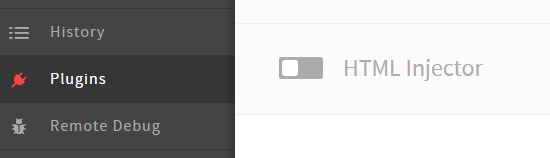
If this is the intended behavior, great!
I might also note that I’m using SSL on localhost, the chrome bar is red, no warning are given on the console however I suspect this might be related. Makes sense?
---
## Post 22 by @ben — 2017-03-24T23:06:36Z
It is related, thanks for pointing that out! Looks like injection is working as expected on non-HTTPS local dev setups
---
## Post 23 by @TonyHawkes — 2017-03-28T01:05:43Z
I can’t seem to get this working either.
For me, HTML is injected into existing tags, but if you remove or add a tag to a Blade template, it breaks the injection and you have to refresh the page.
I’ve tried the changes from the master branch and also QWp6t’s pull request. – Neither have helped unfortunately.
---
## Post 24 by @TonyHawkes — 2017-03-28T01:09:50Z
Sorry, to clarify, I’m using a non-HTTPS local setup.
---
## Post 25 by @alex_ciarlillo — 2017-03-29T19:40:38Z
Ya this is starting to drive me a little crazy. This has been working on and off for me at this point. As of today, I have merged in all the changes from dev-master into my “base” theme and blade watching is working. I then merged my “base” theme into a forked theme I created, and it does not work. I have diff-ed the yarn.lock files and they are the same. I have diff-ed the assets/build directories and they are the same. Blew away node\_modules, reinstalled, etc. All that is different is that my forked theme has different templates (using same base layout though), and has some leftover .php files that I am working on converting into blade templates.
I asked this before, but is there some way to get debug output from BrowserSync? I can see that my watch glob is being passed in (doing a console.log in the webpack.config.watch.js file), but I want to dump the actual file paths the glob is resolving.
I also should point out that disabling the HTML Injector does cause the page to reload when I save a file, so I’m assuming the watch detection is working. But I am still looking for some way of debugging and digging into this problem.
---
## Post 26 by @alex_ciarlillo — 2017-03-30T18:36:38Z
~~Well I was able to debug output from browsersync-webpack-plugin - not to be confused with browser-sync-webpack-plugin :expressionless:. I did this by adding `NODE_DEBUG=browsersyncwebpackplugin` to the `start` script, but it dumps out so much information I can’t really get anything meaningful out of it.~~
~~It kind of feels like this plugin (although obviously useful) is obfuscating the build process. Webpack is already pretty complex, without having to dig further into a plugin to debug things. I'm not trying to dish on QWp6t's hard work, but I feel like with all the build code we already have, what is another ~50-100 lines to accomplish this in a way where can actually see an interact with what is going on, rather than delegate to a plugin?~~~~ All that aside, file changes are definitely being detected, I am getting debug info dumped out every time I save a blade file, just not HTML injection. I have ripped \*everything\* out of my templates directory trying to get to a simplest case, and I'm still coming up short.~~
EDIT: I AM AN IDIOT!
I forgot to disable hypercache on the site I was working on. Since the page is cached, bs-html-injector cannot detect any changes to the HTML. DUH.
---
## Post 27 by @apintocr — 2017-03-31T10:00:13Z
> [@alex_ciarlillo](#):
>
> I forgot to disable hypercache on the site I was working on. Since the page is cached, bs-html-injector cannot detect any changes to the HTML. DUH.
ahaha :slight_smile:
---
## Post 28 by @JulienMelissas — 2017-04-05T17:54:16Z
HTML injecting is working with the latest Sage changes for me on a (mostly) clean install. And I’m running https :thumbsup:
EDIT: Nevermind, doesn’t- work with HTTPS.
EDIT AGAIN: Nevermind my nevermind!! It works the second time I make an update and thereafter. I’m cool with that :slight_smile:
---
## Post 29 by @raffen — 2017-07-14T07:51:20Z
>
I’m also having this issue and that is what fixed this issue for me. Running non-HTTPS and dev-master as of 14th of July. Hoping for a fix soon.
---
## Post 30 by @wbiggs — 2017-11-18T00:01:44Z
Hey all! New to Sage. I’m currently unable to get updates to .blade.php files to show up in BrowserSync. Sass updates are injected fine, though. The config.json file points to the correct directory (I’m using the default structure, so I haven’t changed anything anyway), so I’m totally lost as to what may be causing this.
Some info:
- I created the project today from the `composer create-project roots/sage your-theme-name dev-master` command, so it’s all up to date.
- I’m using the Windows Subsystem for Linux / Ubuntu Bash, which shouldn’t be a problem, but who knows.
Any help would be much appreciated! Thanks!
---
## Post 31 by @wbiggs — 2017-11-18T01:49:01Z
Okay, so adding `"resources/views/**/*.blade.php"` to the watch section in config.json made it mostly work, thank goodness. Sometimes it takes multiple saves for it to trigger, though.
---
## Post 32 by @ben — 2017-11-18T03:06:13Z
This is a 4 month old thread for beta 2 — which version of Sage 9 are you using?
---
## Post 33 by @wbiggs — 2017-11-18T20:31:41Z
Apologies, it’s the same (or a very similar) issue, so I figured I’d use the same thread. I’m using `9.0.0-beta.4`.