Hello,
I’m trying to use wp acorn for the first time and nothing happens. Radicle is installed and everything works. I have tried several commands and nothing happens, the terminal gets stuck on the command and nothing happens.
I should point out that I use Herd and that the project is local.
Can you tell me what the problem is?
Thank you
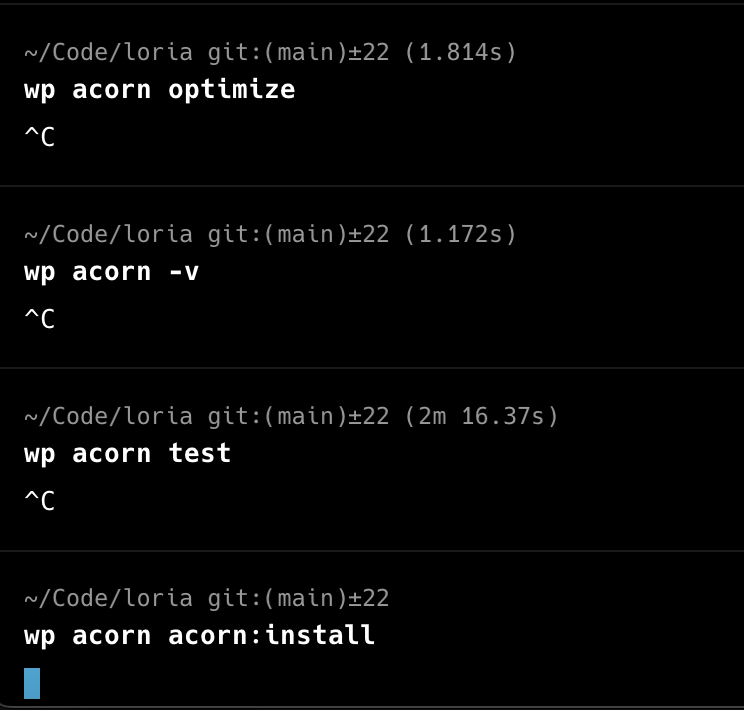
Here’s the composer.json if that helps
{
    "name": "roots/radicle",
    "type": "project",
    "license": "MIT",
    "description": "Radicle is an opinionated starting point for WordPress projects with the Roots stack",
    "homepage": "https://roots.io/radicle/",
    "authors": [
        {
            "name": "Ben Word",
            "email": "[email protected]",
            "homepage": "https://github.com/retlehs"
        }
    ],
    "repositories": {
        "satispress": {
            "type": "composer",
            "url": "xxx"
        },
        "0": {
            "type": "composer",
            "url": "https://wpackagist.org",
            "only": [
                "wpackagist-plugin/*",
                "wpackagist-theme/*"
            ]
        },
        "acf-pro": {
            "type": "composer",
            "url": "https://connect.advancedcustomfields.com"
        }
    },
    "autoload": {
        "psr-4": {
            "App\\": "app/",
            "Database\\Factories\\": "database/factories/",
            "Database\\Seeders\\": "database/seeders/"
        },
        "files": [
            "app/helpers.php"
        ]
    },
    "require": {
        "php": ">=8.2",
        "blade-ui-kit/blade-heroicons": "^2.6",
        "blade-ui-kit/blade-icons": "^1.8",
        "composer/installers": "^2.2",
        "guzzlehttp/guzzle": "^7.9",
        "johnbillion/extended-cpts": "^5.0",
        "log1x/acf-composer": "^3.4",
        "log1x/acorn-disable-media-pages": "^1.0",
        "masterminds/html5": "^2.8",
        "oscarotero/env": "^2.1",
        "roots/acorn": "^5.0",
        "roots/acorn-prettify": "^1.0",
        "roots/bedrock-autoloader": "^1.0",
        "roots/bedrock-disallow-indexing": "^2.0",
        "roots/wordpress": "6.8.1",
        "roots/wp-config": "1.0.0",
        "roots/wp-stage-switcher": "^2.2",
        "satispress/admin-menu-editor-pro": "^2.29",
        "satispress/amazon-s3-and-cloudfront-pro": "^3.2",
        "satispress/funnel-builder-pro": "^3.5",
        "satispress/magic-login-pro": "^2.5",
        "satispress/object-cache-pro": "^1.23",
        "satispress/perfmatters": "^2.4",
        "satispress/pixel-manager-pro-for-woocommerce": "^1.45",
        "satispress/sitepress-multilingual-cms": "^4.7",
        "satispress/wp-mail-smtp-pro": "^4.1",
        "satispress/wp-marketing-automations-pro": "^3.5",
        "satispress/wp-migrate-db-pro": "^2.7",
        "satispress/wpml-string-translation": "^3.3",
        "vlucas/phpdotenv": "^5.5",
        "wpackagist-plugin/funnel-builder": "^3.10",
        "wpackagist-plugin/safe-svg": "^2.3",
        "wpackagist-plugin/woocommerce": "^9.9",
        "wpackagist-plugin/woocommerce-paypal-payments": "^3.0",
        "wpackagist-plugin/wp-marketing-automations": "3.5.2",
        "wpengine/advanced-custom-fields-pro": "^6.4"
    },
    "require-dev": {
        "johnbillion/query-monitor": "^3.17",
        "laravel/pint": "^1.21",
        "pestphp/pest": "^3.7",
        "phpcompatibility/php-compatibility": "^9.3",
        "roave/security-advisories": "dev-latest",
        "spatie/laravel-ignition": "^2.9"
    },
    "config": {
        "optimize-autoloader": true,
        "preferred-install": "dist",
        "allow-plugins": {
            "composer/installers": true,
            "roots/wordpress-core-installer": true,
            "pestphp/pest-plugin": true
        },
        "sort-packages": true,
        "platform": {
            "php": "8.2.18"
        }
    },
    "minimum-stability": "dev",
    "prefer-stable": true,
    "extra": {
        "acorn": {
            "providers": [
                "App\\Providers\\AssetsServiceProvider",
                "App\\Providers\\BlocksServiceProvider",
                "App\\Providers\\ThemeServiceProvider",
                "App\\Providers\\PostTypesServiceProvider"
            ]
        },
        "installer-paths": {
            "public/content/mu-plugins/{$name}/": [
                "type:wordpress-muplugin"
            ],
            "public/content/plugins/{$name}/": [
                "type:wordpress-plugin"
            ],
            "public/content/themes/{$name}/": [
                "type:wordpress-theme"
            ]
        },
        "wordpress-install-dir": "public/wp"
    },
    "scripts": {
        "lint": "pint --test",
        "lint:fix": "pint",
        "test": "pest",
        "post-autoload-dump": [
            "Roots\\Acorn\\ComposerScripts::postAutoloadDump"
        ]
    }
}
Thank you