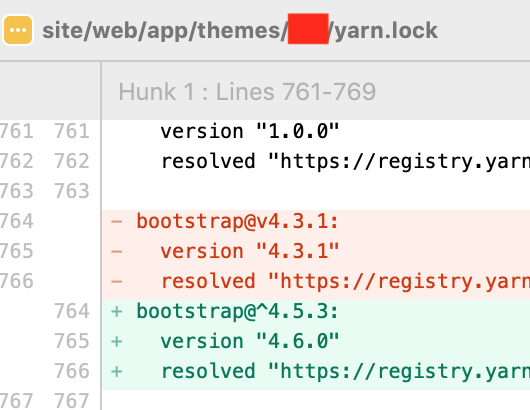
I would like to update bootstrap in Sage to 4.6 because I would like to use responsive containers with the container-{breakpoint class} (and other new classes), but apparently what I am doing seems not working.
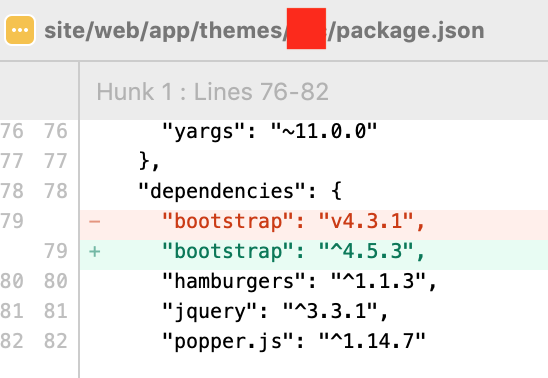
I changed the bootstrap version in package.json within the theme folder:
  "dependencies": {
    "bootstrap": "v4.3.1",
to
"dependencies": {
    "bootstrap": "v4.6.0",
and ran yarn install. and then yarn build
I had the feeling that this was the only thing to do, but maybe I am wrong.
I can see that node-modules/bootstrap is the right version, but when I try to add the class container-md, the css can’t find this class, so I am wondering if I missed a step.
Could somebody point me in the right direction?
what I am missing or what I can try to do?
Note: Changed Sage 9.2 to 9.1 (as 9.0.10 is the current release in master).
Updated Sage 9.x
You can now try out the Sage PR branch for webpack 5 and updated dependencies.
The sage-installer which is used by Sage 9.x for adding framework support was also updated to add the right configuration and styles. Bootstrap 5 (Beta2) has been added for selection. Tailwind 2 is used now.
Trying it out now!
To prevent siloing of existing working forks of Sage 9 + (insert framework), please try this set…
thanks @strarsis, I would prefer to keep sage 9.0.9 because in the past I had problems with the 9.0.10 and because I don’t have a lot of time for this new project, I prefer to use a sage version that for me it is safe.
Could you please let me know what I can do in order to update only bootstrap to a new version, from v4.3.1 to ^4.5.3 (or directly v4.6.0)?
what are the steps to update bootstrap to a new version?
as I said I updated the bootstrap version in package.json within the theme folder, and I ran yarn install . and then yarn build but I can’t see the bootstrap new classes that I am looking for Overview · Bootstrap (Responsive containers are new in Bootstrap v4.4.)
I tried to delete the node_modules folder and run again yarn install . and then yarn build but still no luck.
is there an extra step that I missed?
what else I can try to do?
I write how the problem has been solved just in case somebody will have the same “problem” in the future, as soon as I write a new css rule in the css, I can see the new bootstrap classes.
it needed a new css change in order to load the new bootstrap version within the main sage css (maybe a cache issue).